Pixel vs Server-Side Tracking (2026): Fix Broken Facebook Attribution
Last Updated: August 12, 2026Question: What is the difference between a browser pixel and server-side tracking?
Quick Answer: In the pixel vs server-side tracking comparison, browser pixels lose between 30% and 40% of attribution data because they depend on the user’s browser to fire JavaScript events — which ad blockers and Apple’s ITP routinely block.
Server-side tracking sends conversion data directly from your payment processor to the ad platform without touching the browser, making it immune to device-level privacy restrictions and ad blocking software.
“Media buyers who rely entirely on browser pixels are making scaling decisions on incomplete data. Operators who deploy server-side tracking control their attribution.”
Table of Contents
- 1. Pixel vs Server-Side Tracking: Why the Browser Pixel Is Failing
- 2. Where Your Pixel Data Disappears
- 3. How Pixel Data Loss Corrupts Your Ad Algorithm
- 4. Pixel vs Server-Side: Full Comparison Table
- 5. The Architecture: How Server-Side Tracking Works
- 6. Deployment: The Execution Path
- 7. Why You Need Both Running Simultaneously
- 8. When Server-Side Tracking Is Not Necessary
- 9. Managed vs DIY Attribution
- 10. Frequently Asked Questions
1. Pixel vs Server-Side Tracking: Why the Browser Pixel Is Failing
The Meta Pixel was engineered for an era when browsers executed third-party scripts without restriction and users had no mechanism to prevent tracking. That era ended with Apple’s iOS 14 rollout in 2021 and has continued to erode with every subsequent browser update.
In 2026, the browser pixel operates in an environment that is structurally hostile to the tracking methodology it depends on.
The fundamental problem is architectural. The Meta Pixel fires by injecting JavaScript into the user’s browser and executing that script to transmit an event to Meta’s servers. Every component of this process depends on the browser’s willingness to execute the script and transmit the data.
Ad blocking extensions intercept and suppress the script before it executes. Safari’s Intelligent Tracking Prevention classifies the pixel’s cookie mechanisms as cross-site tracking and restricts or deletes the identifiers it relies on.
iOS’s App Tracking Transparency framework requires explicit opt-in consent for app-level tracking, which the majority of users still decline as of 2026 — 2026 industry benchmarks put average opt-in in the roughly 27% to 35% range globally, up from around 15% at the framework’s 2021 launch but still leaving most users untracked.
Each of these mechanisms independently reduces pixel accuracy, and in practice they stack — a Safari user on iOS who has an ad blocker installed may produce zero attributable pixel events regardless of how many purchases they complete.
The impact is not evenly distributed across advertising audiences. Technical audiences — developers, SaaS operators, security professionals, digital marketers — show significantly higher ad blocker adoption rates than general consumer audiences.
If your product targets these segments, your pixel data loss may exceed the 30% to 40% industry average considerably. A B2B software company advertising to engineers on Meta may be operating on pixel data that represents 50% or fewer of its actual conversions.
The silent failure: Pixel data loss does not produce error messages. Your Events Manager only shows events that arrived successfully — there’s no counter for what got blocked. The only way to detect the gap is comparing your pixel-reported conversion count against your payment processor’s actual transaction count for the same period.
2. Where Your Pixel Data Disappears
The Three Privacy Mechanisms Destroying Your Data
- Safari ITP: Apple’s Intelligent Tracking Prevention caps most JavaScript-set first-party cookies at 7 days by default, but drops that cap to 24 hours specifically for cookies set on a page reached via a link carrying tracking parameters. The
_fbpcookie that Meta’s pixel sets to identify returning visitors falls under this stricter 24-hour rule, breaking attribution for any purchase that occurs more than a day after an ad click. - Privacy Sandbox: Google’s Privacy Sandbox initiative is systematically replacing third-party cookies with privacy-preserving alternatives that provide less granular attribution data. As Chrome implements these changes, browser-based cross-site tracking becomes progressively less reliable even on the browser that historically had the highest pixel compatibility.
- iOS ATT Framework: Apple’s App Tracking Transparency framework requires explicit opt-in consent before any cross-app or cross-site tracking can occur on iOS devices. Current 2026 benchmarks put average opt-in around 27% to 35% globally, meaning roughly two-thirds or more of iOS users still provide no attribution signal to Meta from their device-level behaviour. Combined with ITP on Safari — the default browser on all iOS devices — iOS users represent a large attribution blind spot for browser pixel setups.
The Real-World Impact: $100/Day Campaign
You spend $100 per day on a direct response Meta campaign. Meta Ads Manager reports 3 purchases at $197 average order value — a reported ROAS of 5.9x. Your Stripe dashboard shows 5 purchases at the same value: the pixel captured only 60% of actual conversions, so real ROAS is 3.5x.
Based on the inflated 5.9x figure, you increase budget to $200/day. The algorithm scales toward the audience profile of the 3 visible converters while ignoring the 2 buyers whose data never reached Meta. Your CPA climbs. The campaign degrades.
3. How Pixel Data Loss Corrupts Your Ad Algorithm
The financial consequence of pixel data loss extends beyond reporting inaccuracy. Meta’s ad delivery algorithm uses conversion events to build an audience model — a statistical profile of the characteristics shared by users who completed a purchase.
The algorithm then adjusts bidding and delivery to reach more users who match that profile. When 35% of your purchase events are invisible to the algorithm, it builds its audience model from a biased sample.
Consider the practical implication. Your product appeals to two distinct customer segments: younger technical professionals who use ad blockers at high rates, and older business owners who do not.
Your pixel captures a disproportionate percentage of conversions from the second segment because they generate more visible pixel events. The algorithm learns to optimise toward the second segment. Spend on the first segment decreases because the algorithm interprets it as lower performing.
In reality, the first segment may be converting at equal or higher rates — those conversions are simply invisible to the pixel.
This audience drift compounds over time. Each optimisation cycle reinforces the bias. The algorithm becomes progressively better at finding people like your visible converters and progressively worse at finding your actual full customer base.
ROAS appears stable or even improves as the algorithm gets more efficient at finding the visible segment — but total conversion volume plateaus or declines because a portion of your addressable audience has been effectively excluded from targeting without any deliberate decision to exclude them.
4. Pixel vs Server-Side Tracking: Full Comparison
| Feature | Browser Pixel | Server-Side Tracking |
|---|---|---|
| Data Source | User’s browser — JavaScript execution | Server — payment processor webhook |
| Blocked by Ad Blockers | Yes — frequently | No — bypasses browser entirely |
| iOS 14+ Impact | Severe — ATT reduces identifiers | Minimal — server transmits first-party data |
| Safari ITP Impact | High — 24hr cookie cap on click-decorated links | None — no cookie dependency |
| Conversion Accuracy | 60% to 70% of actual conversions | Near 100% of verified transactions |
| Behavioural Signals | Full — page views, clicks, scroll depth | Transaction events only |
| Event Match Quality | Low to Medium (browser identifiers degrade) | High (hashed first-party data) |
| Setup Complexity | Easy — paste tag in GTM | Moderate to Advanced — webhook configuration |
| Recommended Use | Behavioural signals and upper-funnel events | Purchase conversions and attribution |
5. The Architecture: How Server-Side Tracking Works
Server-side tracking replaces the browser as the event transmission mechanism with your payment processor. When a customer completes a purchase, Stripe or Shopify fires a webhook to your server — in this architecture, a Make.com webhook endpoint.
Make.com receives the raw transaction payload, extracts the customer’s email, phone, and click identifiers, normalises and SHA-256 hashes the PII, and transmits a structured conversion event directly to the Meta Conversions API.
The critical distinction is that this entire process occurs on infrastructure you control, not on the user’s device. The transmission from your Make.com webhook to Meta’s Graph API endpoint travels server-to-server across infrastructure that has no exposure to ad blockers, browser privacy settings, or iOS ATT restrictions.
A customer who has every possible privacy protection enabled on their device — ad blocker, VPN, Safari ITP, iOS ATT opt-out — still generates a server-side conversion event when their payment processes, because the event fires from your server in response to the Stripe webhook, not from their device.
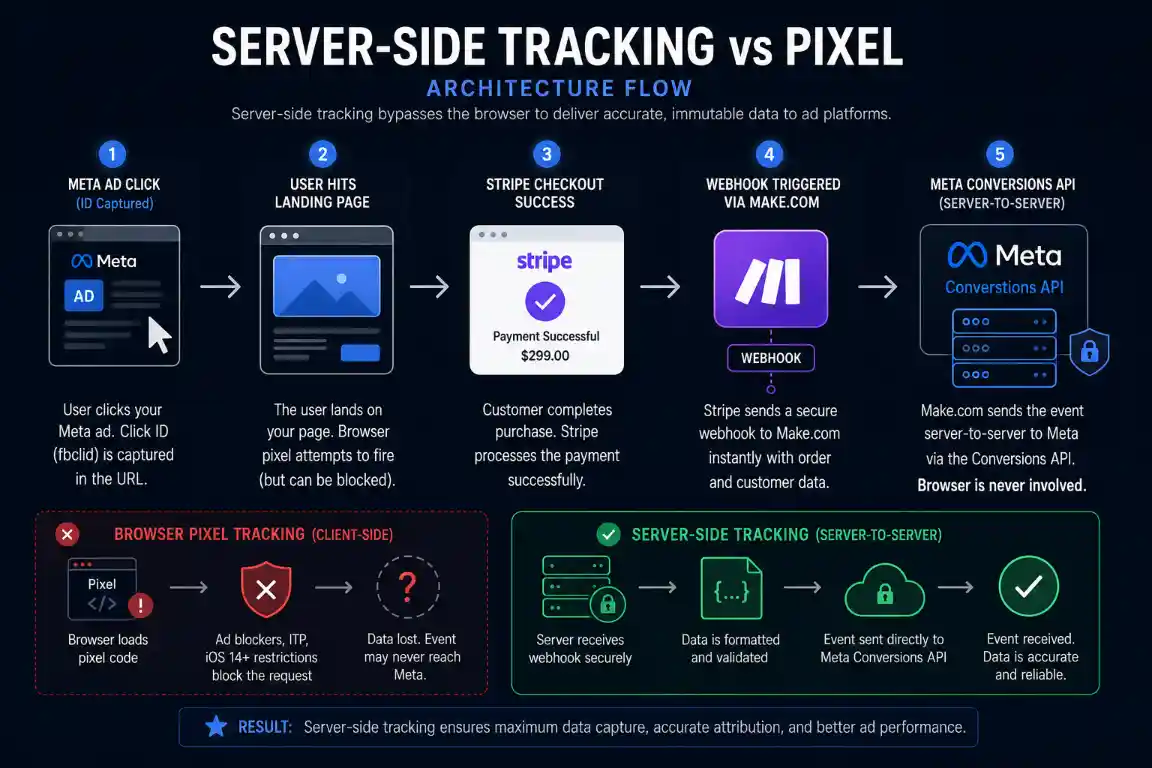
The server-side path bypasses every browser-level privacy restriction. The pixel path does not.
6. Deployment: The Execution Path
Deploying server-side tracking via Make.com follows a four-stage sequence. Each stage has specific configuration requirements that determine whether the final conversion events reach Meta with high Event Match Quality scores.
- Webhook Configuration: Create a Make.com custom webhook endpoint and configure your payment processor to send transaction events to that URL. In Stripe, navigate to the Developers section and create a webhook endpoint listening for
charge.succeededevents. This ensures only verified payments trigger the attribution pipeline. - Click ID Capture: The
fbclidparameter appended to your landing page URL when a user clicks a Meta ad must be captured and carried through your checkout flow to the payment webhook. Store it in Stripe payment intent metadata at checkout initiation so it appears in the webhook payload. Without this step, your server events will have nofbcparameter and your Event Match Quality score will be limited. - PII Normalisation and Hashing: Extract the customer email and phone from the webhook payload, normalise them (lowercase email, country code prefix for phone, no formatting characters), and apply SHA-256 hashing using Make.com’s built-in cryptographic functions. Hashing before normalisation produces incorrect hash values that fail to match Meta’s stored user data. The full normalisation sequence is in our CAPI match quality guide.
- Graph API Transmission: Route the structured payload to Meta’s Graph API endpoint via Make.com’s HTTP module. Include the
event_idmatching whatever your browser pixel fired for the same conversion — this enables deduplication so Meta merges both signals into one conversion rather than counting them separately. The deduplication configuration is covered in our CAPI deduplication guide.
If your HTTP module returns 400 Bad Request errors during testing, the payload JSON structure contains a formatting error. The most common causes are malformed field arrays, missing required fields, or incorrect data types for numeric values. Our CAPI 400 error guide documents the exact fixes for each error type.
7. Why You Need Both Running Simultaneously
The correct architecture is not pixel or server-side tracking — it is both running simultaneously with proper deduplication configured. Each approach captures data that the other cannot.
The browser pixel captures real-time behavioural signals that occur entirely in the browser before any server interaction happens: page views, button clicks, add-to-cart events, checkout initiations, scroll depth, and time on page.
Meta uses these upper-funnel signals to build audience models and optimise delivery toward users who exhibit the same pre-purchase behaviour. Server-side tracking cannot capture these signals because they have no corresponding server event.
Server-side tracking captures verified purchase events with high accuracy and high Event Match Quality. It cannot capture pre-purchase behaviour signals because those events occur client-side without generating server transactions.
Running both together with matching event_id deduplication gives Meta both the behavioural signal richness of browser pixel data and the conversion accuracy of server-side data. The algorithm receives a complete picture of the customer journey without either the data gaps of pixel-only setups or the behavioural signal gaps of server-only setups.
The Recommended Dual Architecture
Browser pixel fires PageView, AddToCart, and InitiateCheckout events for behavioural optimisation. Server-side CAPI fires the Purchase event with full hashed customer data and click ID for accurate conversion attribution.
The Purchase event from the pixel is also fired with the same event_id as the server event. Meta’s deduplication engine merges both Purchase signals into one conversion record, using the server data’s superior customer identifiers while retaining the pixel’s session context signals.
8. When Server-Side Tracking Is NOT Necessary
Server-side tracking adds configuration overhead that is not justified for all campaigns. Stick with browser pixel only if all of these apply to your situation:
- You run low-budget awareness campaigns where exact purchase attribution is not critical to scaling decisions
- You rely entirely on native Meta lead generation forms inside the Facebook or Instagram app — these do not involve your website and have no pixel drop-off
- Your entire audience is on Android Chrome with no ad blockers — a scenario that makes pixel accuracy relatively high
- You are not running direct response campaigns with purchase conversion objectives above $3,000 per month in ad spend
For any operator running purchase-objective campaigns above $5,000 per month, the accuracy improvement from server-side tracking produces measurable ROAS improvement that justifies the setup investment within the first billing cycle.
9. Managed vs DIY Attribution
The Make.com webhook pipeline described above requires initial configuration time of approximately 45 minutes to one hour for operators comfortable with webhook setup, plus ongoing maintenance when Meta updates API schema requirements.
For teams who prefer a managed implementation, dedicated attribution platforms handle the click ID capture, PII hashing, and payload formatting automatically.
The tradeoff is cost versus control. A custom Make.com build costs roughly $9 to $50 per month depending on transaction volume and billing cycle, with full data ownership. Managed platforms typically start at $99 per month with the platform handling your conversion data on their infrastructure.
Which side of that tradeoff makes sense depends entirely on whether you have someone comfortable maintaining a webhook pipeline — teams that do save money every month; teams that don’t often find the managed cost worth the maintenance they’re not doing themselves.
Free CAPI Payload Template
Download the exact Make.com scenario file for routing Stripe webhooks to the Meta Conversions API. Import in one click, add your credentials, and the server-side pipeline is operational immediately.
Download the JSON BlueprintRelated Attribution Guides
See What Pixel Loss Is Actually Costing You
Before you build the pipeline, get a real number. Enter your traffic mix and see your conversion gap, invisible revenue, and EMQ penalty.
Calculate Your Attribution Loss →10. Frequently Asked Questions
The Facebook pixel fires JavaScript events from the user’s browser. Ad blockers suppress the script before it executes. Safari’s Intelligent Tracking Prevention deletes the cookie identifiers the pixel relies on within 24 hours for click-decorated links. iOS privacy frameworks require explicit tracking consent that most users still decline. Each mechanism independently reduces pixel accuracy, and in technical B2B audiences where ad blocker adoption is high, combined data loss frequently exceeds 40% of actual conversions.
The Facebook Pixel fires from the user’s browser using JavaScript and can be blocked by any privacy mechanism on the user’s device. The Conversions API fires from your server in response to payment processor webhooks and transmits directly to Meta’s servers without touching the user’s device. A customer with every privacy protection enabled still generates a server-side conversion event because the transmission originates from your server, not their browser.
Yes. iOS 14’s App Tracking Transparency framework restricts app-level tracking and cross-site identifier collection on the device. Server-side tracking never executes on the user’s device — it fires from your payment processor’s webhook to your server, then from your server to Meta’s API. Device-level privacy restrictions cannot intercept a server-to-server transmission that does not involve the device.
Yes — this is the recommended architecture. The browser pixel captures pre-purchase behavioural signals including page views, add-to-cart events, and checkout initiations that server-side tracking cannot observe. Server-side CAPI captures verified purchase events with high accuracy. Running both with matching event_id deduplication gives Meta a complete view of the customer journey without double counting. The pixel handles upper-funnel behavioural optimisation. CAPI handles purchase attribution.
Industry data and practitioner testing consistently show browser pixels lose between 30% and 40% of purchase events in general consumer audiences. B2B and technical audiences with high ad blocker adoption rates show higher loss — frequently 40% to 55%. The gap is detectable by comparing Meta’s reported purchase count against your payment processor’s actual transaction count for the same time period. Any gap between these two numbers represents events the pixel failed to capture.
When the pixel misses conversions, Meta’s reported ROAS inflates artificially — fewer attributed conversions at the same spend produces a higher apparent cost per acquisition than the real figure. More critically, the algorithm optimises audience targeting based only on the visible converters, creating systematic audience drift away from the customer segments that generated the invisible conversions. This produces campaign degradation over time as the algorithm becomes progressively better at finding people like the visible subset and progressively worse at reaching your full addressable audience.
Server-side tracking is not necessary if you run awareness campaigns where purchase attribution is not critical, if you rely entirely on native Meta lead forms inside the app, or if you are spending less than $3,000 per month on direct response campaigns. For any operator running purchase-objective campaigns above $5,000 per month, the accuracy improvement from server-side tracking produces measurable ROAS improvement that justifies the setup investment within the first month of deployment.
Make.com provides a no-code webhook routing environment that handles the complete server-side conversion pipeline without custom code. Configure a Make.com custom webhook as the receiving endpoint for Stripe payment events, use Make.com’s built-in SHA-256 hashing tools to normalise and hash customer PII, and route the formatted payload to the Meta Graph API via an HTTP module. Operators comfortable with webhook configuration can complete the initial setup in approximately 45 minutes to one hour using the blueprint available in our automation library.