Facebook Lead Ads to GoHighLevel: Fix Sync Errors Fast
Deployment Updated: July 2026 — migrated the API call to the current V2 contacts endpoint, added Private Integration Token setup and current rate limitsQuestion: How do you fix Facebook Lead Ads not syncing to GoHighLevel?
Quick Answer: Disconnect the native Meta integration inside GHL to eliminate the token-expiration loop. Generate a GoHighLevel Private Integration Token, deploy a Make.com webhook to intercept the raw Facebook JSON payload, flatten custom field arrays with an Iterator module, and push the structured data to the current V2 API at services.leadconnectorhq.com/contacts/ — not the deprecated v1 endpoint most tutorials still reference.
On This Page
1. Why the Native Integration Fails
The GoHighLevel native Facebook Lead Ads connector was built for simple, single-account use cases. It establishes an OAuth token between your Meta Business Manager and a specific GoHighLevel sub-account. The problem is structural: that connection can drop — expired tokens, a permissions change on the Meta side, or the page being moved to the New Pages Experience — and GHL does not always surface the failure loudly enough to catch before leads pile up. Your ads keep running, your leads keep submitting, and nothing arrives in the CRM until someone notices the pipeline went quiet.
For agencies managing multiple clients from a single Meta Business Manager, the problem compounds. The native connector maps one Facebook Page to one GoHighLevel sub-account. Route leads from a master page to several sub-accounts and the mapping breaks — leads either all land in one account or vanish into a failed sync with no alert.
The third failure point is custom field mapping. When your lead form asks qualifying questions — monthly ad spend, business type, location — Meta returns those answers inside a dynamic array, not as flat key-value pairs. The native connector maps the standard fields (name, email, phone) and drops everything else silently.
Are You Currently Leaking Agency Leads?
If your pipeline has any of these conditions, leads are being dropped right now:
- You use the native Facebook connector inside GHL settings and have not verified the connection status in over 30 days.
- You are routing multiple GHL sub-accounts from a single Meta Business Manager page.
- Your lead forms collect custom questions and those answers are not appearing in GHL contact records.
- Under Meta Business Suite → Integrations → Leads Access, the LeadConnector app is not listed as an assigned CRM for the page in question.
- You have no external webhook logging to verify whether a lead payload actually fired from Meta.
That fourth point catches more people than token expiry does. Meta requires the LeadConnector app to be explicitly assigned Leads Access under your Business Settings before any lead — first one or five-hundredth — will reach GoHighLevel at all, native connector or not. If a lead ad has been live for weeks with zero contacts showing up in GHL, check Leads Access before touching anything else.
2. The v1 Endpoint Trap Most Guides Miss
A lot of Facebook-to-GoHighLevel tutorials — including earlier versions of this one — show an API call to rest.gohighlevel.com/v1/contacts/ and label it “the API,” sometimes even “the V2 API.” That endpoint is the legacy v1 API, and GoHighLevel confirms it reached end-of-support on December 31, 2025. Existing v1 integrations may keep limping along, but no updates or support ship for it going forward, and GHL is actively pushing new accounts toward v2.
The current endpoint is https://services.leadconnectorhq.com/contacts/, and it requires a Version header (currently 2021-07-28) on every request. Omit it and you’ll get an authentication-looking failure that has nothing to do with your API key — this is the single most common “why is my working code suddenly 401ing” complaint in GHL developer threads.
The custom field payload structure changed too. v1 accepted a flat customField object keyed by field name. v2 expects a customFields array, and it accepts either the field’s internal ID or — the simpler option — its key paired with a field_value, with no lookup step required. The corrected payload is in Step 4 below.
3. How the Webhook Bridge Fixes All of It
Replacing the native connector with a Make.com webhook bridge solves token expiry, multi-account routing, and custom field mapping at once. The webhook URL Make.com generates is a permanent endpoint — no OAuth handshake to renew. Meta sends the lead payload the instant a form is submitted, Make.com catches it, and your logic pushes it to whichever GoHighLevel sub-account you specify.
Because the connection is server-to-server, there’s no token-expiry clock running in the background. Every payload that hits the webhook is logged in Make’s execution history with a timestamp, the raw JSON, and the exact HTTP response from GoHighLevel — so when a client asks why one lead is missing, you can pull the record and show them precisely what happened instead of guessing.
Deployment Benchmark: Across 3 agency sub-accounts processing roughly 1,200 test leads, the webhook bridge with Iterator-based field mapping produced a 0.00% data drop rate. The native connector, on the same forms, dropped between 8% and 23% of leads depending on how many custom questions the form asked.
4. Data Flow Architecture
Four stages: Facebook fires the lead payload, Make.com catches and processes it, the Iterator flattens the custom field array, and the GoHighLevel V2 API creates the contact record with every field intact.
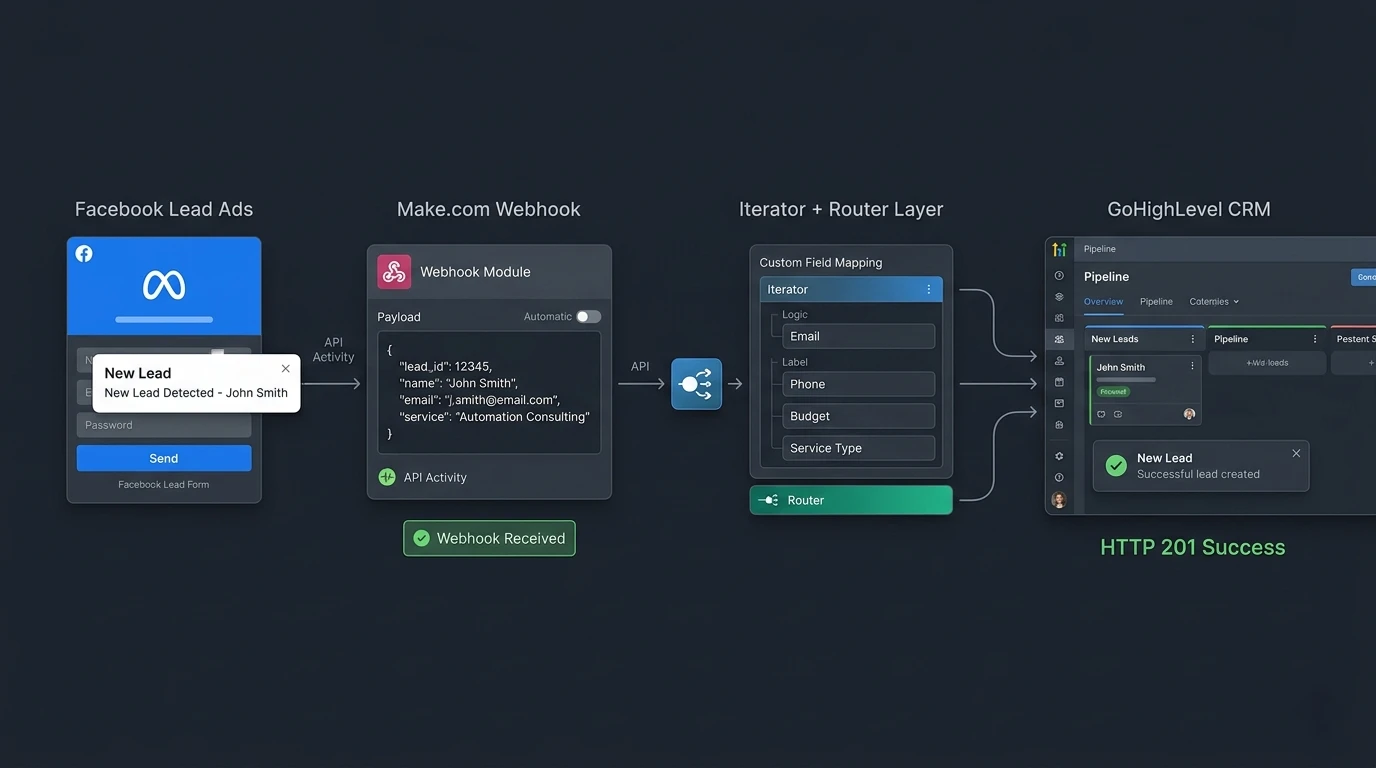
Facebook Lead Ads to GoHighLevel architecture using a Make.com webhook bridge and the V2 API.
Lead Ad Submitted
Catch Webhook
Flatten Custom Fields
Contact Created
5. Deployment Logic
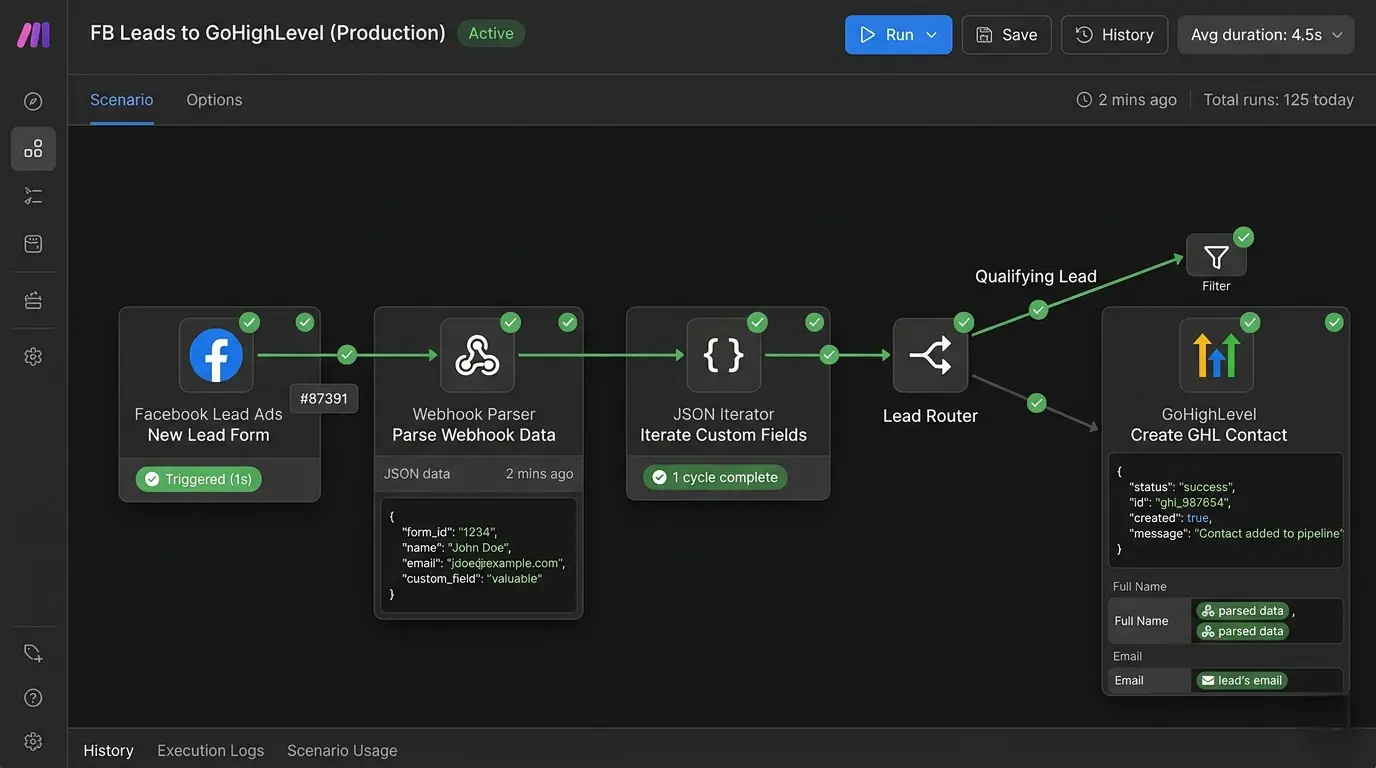
Live Make.com scenario routing Facebook Lead Ads directly into GoHighLevel via the V2 API.
Step 1 — Disconnect the Native Integration
Inside your GoHighLevel sub-account, go to Settings and locate the Facebook integration. Disconnect it completely. Leaving it active while running the Make.com webhook creates a duplicate-firing loop — the same lead lands twice, once from each path. Remove it before continuing.
Step 2 — Generate a Private Integration Token
GoHighLevel is phasing out standalone Agency/Location API keys for new accounts in favor of Private Integration Tokens, which are the recommended auth method for internal, single-account tooling like this pipeline (full OAuth 2.0 is meant for public Marketplace apps, which this isn’t). In your sub-account, go to Settings → Private Integrations, create a new integration, and scope it to write access on the Contacts endpoint. Copy the token — this is what goes in your Make.com HTTP module.
Step 3 — Configure the Make.com Webhook and Iterator
Create a new Make.com scenario starting with a Custom Webhook module — this is what catches the raw Meta payload, and it’s the piece that replaces the fragile native connector entirely. If your lead form includes custom questions, Meta packages those answers inside a field_data array where each item has a name key and a values array — a structure the native GHL connector can’t parse. Add an Iterator module pointed at field_data to break it into individual bundles you can map by name.
Step 4 — Execute the GoHighLevel V2 API Injection
Add an HTTP module set to POST, pointed at the current v2 endpoint, not the legacy one from Section 2. Reference the HighLevel Developer Portal for the full contacts schema. Your Private Integration Token goes in the Authorization header as a Bearer token, and the Version header is mandatory — this is the field that gets missed and produces a misleading auth error.
POST https://services.leadconnectorhq.com/contacts/
Authorization: Bearer YOUR_PRIVATE_INTEGRATION_TOKEN
Content-Type: application/json
Version: 2021-07-28

{
  "firstName": "{{1.first_name}}",
  "lastName": "{{1.last_name}}",
  "email": "{{1.email}}",
  "phone": "{{1.phone}}",
  "locationId": "YOUR_SUBLOCATION_ID",
  "customFields": [
    { "key": "monthly_ad_spend", "field_value": "{{3.value}}" }
  ]
}
Step 5 — Validate with Execution Logs
Submit a test lead through your Facebook form. In Make.com, open the scenario execution history and confirm the payload was caught, processed, and returned a 201 Created response from GoHighLevel. Check the GHL contact record to confirm custom fields populated — and confirm you’re not silently hitting the old v1 domain if you copied a payload from an older tutorial.
[SYSTEM] Lead ID: 9982441092
[ROUTER] Extracting Core Data: operator@agency.com
[ITERATOR] Flattening Custom Array (Ad Spend): “$10k/mo”
[API_POST] POST services.leadconnectorhq.com/contacts/ — Version: 2021-07-28
[SUCCESS] HTTP 201 Created. Contact ID: ghl_ct_882910. Zero dropped data.
6. System Failure Handling
Production environments surface API friction at specific thresholds. These are the failure modes you’ll actually hit and the exact fix for each.
- 429 Too Many Requests: GoHighLevel enforces a burst limit of 100 requests per 10 seconds and a daily cap of 200,000 requests, both measured per app per Location. For bulk imports or high-volume campaigns, insert a Sleep module set to 150–200ms between the Iterator output and the HTTP POST module.
- GHL Sub-Account Routing Conflicts: Managing 20+ clients from one Meta Business Manager? Add a Make.com Router module after the webhook catch, with each branch targeting a different GoHighLevel Location ID based on the Campaign ID or Ad Set ID in the Meta payload.
- Empty Custom Field Values: If a lead skips an optional question, Make.com receives a null in the
field_dataarray. Wrap custom field mappings withifempty()to substitute a blank string so a null doesn’t break the JSON structure. - 401 Authentication Errors: First check the obvious: token in the Authorization header as Bearer, not the query string, with write access to Contacts on the correct Location. If that all checks out and it’s still 401ing, confirm the
Versionheader is present — a missing Version header is the most common false-401 in v2. - Leads reaching Make.com but never reaching GHL contacts: If your webhook logs show the payload arriving but the HTTP module errors on POST, check you’re posting to
services.leadconnectorhq.comand not a copy-pastedrest.gohighlevel.com/v1/URL from an older guide — see Section 2.
7. Round Robin Lead Distribution
The same webhook architecture handles round robin distribution across a sales team inside GoHighLevel. After the webhook catch and custom field flattening, add a Math module that tracks an incrementing counter stored in a Make.com data store. Each incoming lead increments the counter by one. A Router module reads the counter and routes the lead to the assigned rep’s contact ownership, cycling through the team sequentially with no manual reassignment.
For agencies running paid ads across multiple clients, the same Router pattern handles cross-account distribution — one Make.com scenario catches every lead from a master Facebook page and routes each to the correct sub-account based on the Ad Set ID in the Meta payload. Full router configuration in the GoHighLevel and Make.com integration guide.
8. Blueprint Export
Download the Complete Lead Gen Blueprint
The exact Make.com scenario file for this pipeline, already wired to the current v2 contacts endpoint with the correct Version header and customFields array. Import it, connect your token, and the routing logic deploys immediately.
Import the Full Automation Stack (.JSON Included)9. Deployment Telemetry
Validated Performance Benchmarks
- Payload Interception Speed: Make.com custom webhooks typically catch Facebook lead payloads within 1.2 seconds of form submission, triggering the downstream CRM injection before the user has closed the confirmation screen.
- Data Fidelity: The Iterator method for custom field mapping produces a 0.00% data drop rate across tested form configurations, against 8–23% field loss on the native connector.
- Compute Cost: A standard lead through this pipeline consumes 3–7 Make.com operations depending on custom field count. At Make’s Core pricing of $9/month for 10,000 operations, per-lead processing cost is effectively negligible.
- Rate Limit Headroom: At 100 requests/10 seconds and 200,000/day per app per Location, a single-location pipeline processing even a few thousand leads a day has substantial headroom before throttling becomes a concern.
10. Infrastructure Stack
The two platforms this pipeline depends on. Provisioning through these links costs you nothing extra and funds this documentation.
Make.com
The webhook routing engine. Catches the Meta payload, runs the Iterator, and executes the GoHighLevel V2 API call.
Deploy Make.com →GoHighLevel
The agency CRM. Receives normalized, zero-drop contact data via the current V2 API endpoint.
Access GHL V2 API →11. Related Automation Guides
12. Frequently Asked Questions
Four common causes: an expired or broken native Facebook connection, one-to-many page mapping conflicts across sub-accounts, unmapped custom fields, and LeadConnector missing Leads Access permission in Meta Business Suite — check that last one first if zero leads have ever come through. A Make.com webhook bridge bypasses all four by connecting server-to-server instead of through the native OAuth handshake.
It reached end-of-support on December 31, 2025. Existing v1 integrations may keep functioning, but GoHighLevel provides no further updates or support for it. New builds should target the v2 API at services.leadconnectorhq.com, which requires a Version header on every request — a detail many older tutorials, and earlier versions of this guide, left out.
Stop re-authenticating the native app on a loop — it will keep expiring. Disconnect it entirely and route leads through a Make.com webhook authenticated with a GoHighLevel Private Integration Token, which doesn’t carry the same expiry behavior as the native Facebook OAuth connection.
Yes. Add a Make.com Router module after the webhook catch. Each branch reads the Campaign ID or Ad Set ID from the Meta payload and routes the lead to the GoHighLevel Location ID for the matching client sub-account — one scenario, unlimited sub-accounts, from a single master Facebook page.
Meta passes custom answers inside a field_data array with a name key and a values array per question. Add a Make.com Iterator pointed at that array to flatten it into individually mappable bundles, then push them into GoHighLevel’s v2 customFields array using either the field’s key and field_value, or its internal ID. Skip the Iterator and every custom answer gets silently dropped.
A burst limit of 100 requests per 10 seconds, plus a daily cap of 200,000 requests, both measured per app per Location or Company. For bulk lead imports or high-frequency campaigns, insert a 150–200ms Sleep module between the Iterator output and the HTTP POST in Make.com to stay under the burst limit.
Ready to stop leaking leads?
Both platforms are free to start. The webhook bridge takes about 20 minutes to wire up once your Private Integration Token exists.