Pixel vs Server-Side Tracking (2026): Meta Pixel vs CAPI
Last updated: September 30, 2026Question: What is the difference between a browser pixel and server-side tracking?
Quick answer: A browser pixel sends conversion events from the visitor’s browser, so delivery depends on the browser running the script and on that browser’s storage, privacy and blocking settings.
Server-side tracking sends events from your backend, for example after a payment webhook, so delivery does not depend on the browser. Neither is automatically more accurate: server events still need consent, good matching data and a correct implementation.
“Browser tracking and server-side tracking answer different questions. The dependable setup runs both, deduplicates them, and checks the result against your own transaction records.”
Table of contents
- 1. Why the browser pixel can miss conversions
- 2. Where browser signals can be lost
- 3. How missing signals affect your campaigns
- 4. Pixel vs server-side: full comparison
- 5. The architecture: how server-side tracking works
- 6. Deployment: the execution path
- 7. Why run both together
- 8. When server-side tracking may not be necessary
- 9. Managed vs DIY attribution
- 10. Frequently asked questions
1. Pixel vs server-side tracking: why the browser pixel can miss conversions
The Meta Pixel works by loading JavaScript in the visitor’s browser. That script then sends events, such as a purchase, to Meta. Every step depends on the browser: it has to load the script, run it, keep any identifiers the script stores, and complete the network request.
Any of those steps can fail. A content blocker can stop the script from loading. Browser storage rules can shorten how long identifiers last. A visitor’s consent choices can limit what gets stored or sent. A page closed at the wrong moment can drop the request entirely.
These effects can stack. A visitor using Safari with a content blocker may produce very little browser-side signal, however many purchases they complete.
The size of the gap varies substantially by browser, implementation, audience, consent model and attribution setup. There is no universal loss percentage you can apply to every advertiser, and any figure you read that claims otherwise should be treated with caution. Audiences that skew technical tend to use content blockers more, so the gap for them is often larger, but you have to measure your own.
The silent failure: Events Manager only shows events that arrived. It has no counter for events that never made it. To gauge your own gap, compare the purchases Meta reports with confirmed orders you can independently tie to Meta ad clicks, for example orders that carry a captured fbclid or UTM parameters. A difference between Meta’s count and your total payment-processor count is not pixel loss by itself, because many purchases come from other sources.
2. Where browser signals can be lost
Three mechanisms that can affect browser-based measurement
- Content blockers: Ad blockers and tracking-protection extensions can stop tracking scripts from loading or block their requests, so the event is never sent.
- Safari Intelligent Tracking Prevention: WebKit’s tracking prevention can restrict how long JavaScript-created storage lasts. In link-decoration scenarios, WebKit documents a 24-hour cap for affected JavaScript-created cookies, while other script-writeable storage can be subject to a 7-day limit depending on the conditions. This can weaken the link between an ad click and a purchase that happens days later.
- Browser privacy controls and consent: Cookie settings, tracking protection and consent choices affect which client-side identifiers are available and how long they persist. Chrome’s current approach leaves third-party cookie choice with the user in its settings rather than following the earlier plan to phase cookies out for everyone.
One point is easy to get wrong. On Apple platforms, several different privacy mechanisms exist and they should not be treated as the same restriction. App Tracking Transparency applies to apps that link their data with data from other companies’ apps and websites for advertising or measurement. Safari’s Intelligent Tracking Prevention is a separate mechanism that limits certain web tracking and browser storage. ATT opt-in rates therefore tell you little about how a website pixel behaves in Safari.
Illustrative example: a $100 campaign
Assume five confirmed purchases were generated from Meta-ad traffic during a $100 campaign, but Meta records only three of them. At a $197 average order value, Meta-reported revenue would be $591, a reported ROAS of 5.91x. The five confirmed purchases represent $985 of revenue, a 9.85x observed revenue ROAS.
The example shows the difference between platform-reported attribution and independently verified transaction data. It does not mean every gap between your payment processor and Meta represents pixel loss.
3. How missing signals affect your campaigns
The cost of missing conversion signals is not limited to reporting. Meta’s delivery system learns from the conversion events it receives, so what it can see shapes how it optimises.
When conversion events are missed, platform-reported attribution can undercount revenue and conversions. That can make reported ROAS appear lower, and reported cost per acquisition appear higher, than the figures you would calculate from independently verified attributed transactions. You might pause or cut a campaign that is performing better than its dashboard suggests.
Missing signals can also matter for optimisation. If the events Meta receives come disproportionately from some kinds of visitors, the system has a less representative picture of who converts. How much this matters depends on which signals are missing and how the campaign is configured, so treat it as a risk to check rather than a fixed effect.
4. Pixel vs server-side tracking: full comparison
| Feature | Browser pixel | Server-side tracking |
|---|---|---|
| Data source | The visitor’s browser, via JavaScript | Your backend, for example a payment-processor webhook |
| Conversion capture | Depends on browser execution and the browser signals available | Can capture backend-confirmed transactions independently of browser execution |
| Ad blockers | Can interfere with browser event delivery | Server transmission does not depend on browser script execution |
| Browser privacy controls | Can affect cookies, identifiers and event delivery | Avoids browser execution, but does not remove consent or matching requirements |
| Apple privacy controls | Safari ITP is the relevant browser-side mechanism for web tracking | ATT concerns app-based tracking and applies depending on whether your flow is app-based or web-based |
| Matching and accuracy | Depends on the browser signals available and any advanced matching you configure | Strong for confirmed transactions, but Meta attribution still depends on the matching signals you supply. Meta reports Event Match Quality for server events. |
| Behavioural signals | Strong for browser-side interactions | Limited to events and data your backend can see |
| Setup and maintenance | Generally simpler | More configuration and ongoing maintenance |
| Best use | Behavioural signals and upper-funnel events | Backend-confirmed purchases and other server-side events |
5. The architecture: how server-side tracking works
Server-side tracking moves event delivery from the browser to backend infrastructure. In this architecture, a successful payment webhook can trigger a server event without requiring the browser to execute the conversion request.
When a customer completes a purchase, Stripe or Shopify sends a webhook to an endpoint you control, here a Make.com webhook. Make.com receives the transaction payload, extracts the customer details and click information you captured, normalises and hashes the personal data, and sends a structured event to the Meta Conversions API.
This reduces dependence on browser execution and browser storage. It does not override consent requirements, applicable privacy laws, missing identifiers, or Meta’s event-matching requirements.
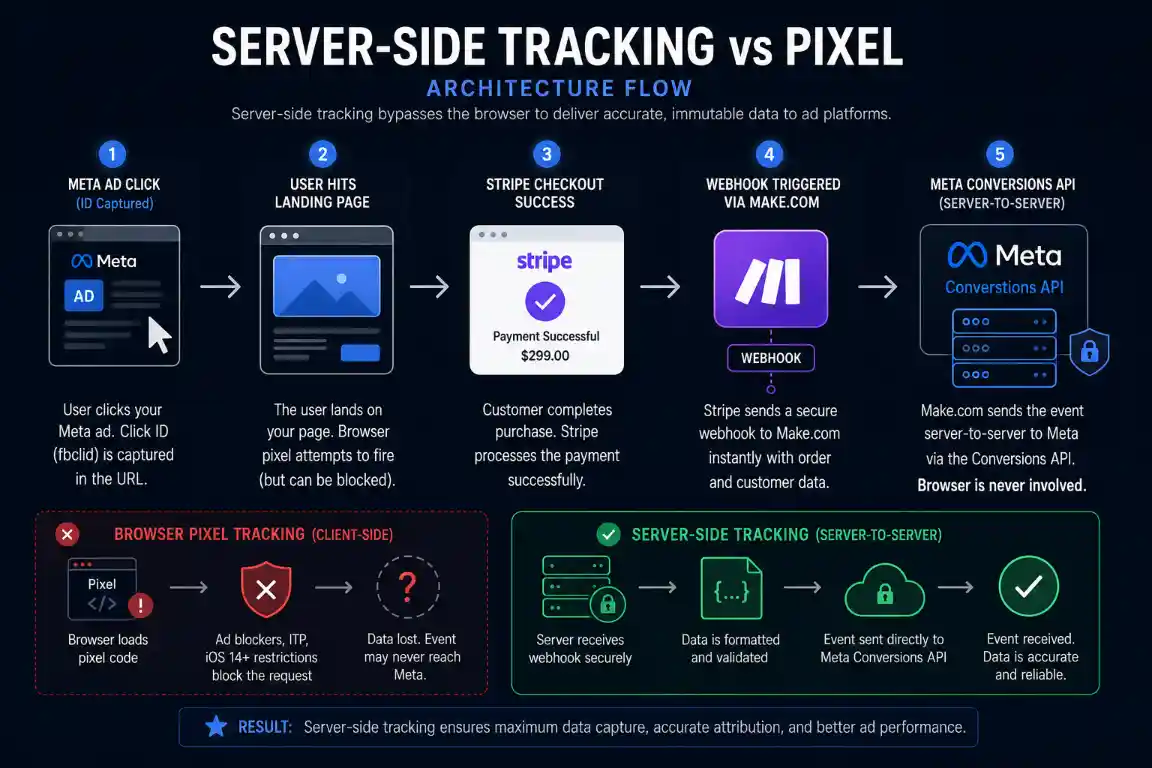
The server-side path removes browser execution from the event-delivery step.
Software for this workflow
Make.com can be used as the webhook orchestration layer for this implementation. Review the current Make plans and decide whether its visual workflow model fits your setup. Make uses a credit-based pricing model, so the cost of a workflow depends on the credits it consumes and the plan you choose.
Explore Make.comAffiliate disclosure: this is an affiliate link. If you purchase through it, CreatorOpsMatrix may earn a commission at no additional cost to you.
6. Deployment: the execution path
Privacy note: Hashing does not by itself make data processing lawful or permissible. Only send customer information to Meta when you have the appropriate rights, permissions and legal basis for the specific processing activity, and follow the current requirements of Meta and applicable privacy law.
Deploying server-side tracking with Make.com follows four stages. Each has configuration requirements that affect how well Meta can use the events you send.
- Webhook configuration: Create a Make.com custom webhook and point your payment processor at it. Configure the Stripe webhook event that represents the successful transaction in your checkout architecture. Depending on your Stripe implementation, this may be a PaymentIntent or a Charge event. The requirement is that the webhook represents the business event you intend to send to Meta and that you handle duplicate deliveries and retries.
- Click information capture: Capture the Meta click information on the landing page and preserve the required attribution value, or preserve the raw
fbclidtogether with its original click timestamp. Carry it through checkout, for example in payment metadata, so the server event can include a correctly formattedfbcvalue where appropriate. Thefbcvalue contains more than the rawfbclid, so rebuilding it at purchase time without the original timestamp can produce an incorrect value. - Normalisation and hashing: Make includes SHA-256 hashing functions that can transform customer information before it goes into an API payload. Normalise each field first, according to Meta’s current requirements, then hash it. Hashing before normalising produces values that will not match. The full sequence is in our CAPI match quality guide.
- Graph API transmission and deduplication: Send the payload through Make’s HTTP module. Generate one stable event ID for the purchase, send it with both the browser Purchase event and the server Purchase event, and keep the event name consistent across both. This lets Meta recognise the two reports as the same conversion rather than two separate ones. Reuse the ID rather than generating unrelated IDs for each request. See our CAPI deduplication guide.
The absence of fbc can remove an important matching signal for Meta ad traffic, but it does not by itself determine the final Event Match Quality. Match quality depends on the full set of signals that are available and correctly formatted.
If the HTTP module returns 400 Bad Request errors during testing, the payload has a formatting problem. Common causes are malformed field arrays, missing required fields, or wrong data types for numeric values. Our CAPI 400 error guide covers the fixes.
7. Why run both together
The practical choice is rarely pixel or server-side. Meta’s own Conversions API guidance says using both tools provides more complete and reliable data sharing. Each one sees things the other cannot.
The browser pixel observes interactions that happen entirely in the browser: page views, clicks, add-to-cart actions and checkout starts. Your backend has no record of these, so server-side tracking cannot send them.
Server-side tracking can reliably receive backend-confirmed purchase events when the underlying transaction webhook and implementation are correct. Whether Meta can match and use those events effectively depends on the customer and event signals you supply with them.
A common dual setup
The browser pixel sends PageView, AddToCart and InitiateCheckout events. The server sends the Purchase event from the payment webhook.
If the browser also sends a Purchase event, both carry the same event name and the same event ID, so Meta can treat them as copies of one purchase rather than two.
8. When server-side tracking may not be necessary
Server-side tracking adds implementation and maintenance overhead. It may be unnecessary when your campaigns do not depend heavily on website conversion measurement, your business does not have a suitable backend event source, or the extra infrastructure would add more complexity than value.
It becomes more relevant when you have reliable backend conversion events, depend heavily on conversion optimisation, need stronger first-party event signals, or want a second delivery path alongside browser tracking.
There is no spend threshold that decides this. Weigh what a missed or mismatched conversion costs you against the effort of building and maintaining the pipeline.
9. Managed vs DIY attribution
A Make.com webhook pipeline takes setup time and ongoing maintenance, particularly when Meta changes its API requirements. How long setup takes depends on your familiarity with webhooks and on your checkout and payment configuration.
Teams that prefer a managed implementation can use dedicated attribution platforms that handle click capture, hashing and payload formatting for them. The trade-off is cost against control. A custom build gives you greater control over the workflow and data handling, but someone has to maintain it. A managed platform takes that maintenance off you, at a subscription cost and with your conversion data handled on their infrastructure.
Make’s pricing is credit-based and changes over time, so check its current pricing before estimating what a production workflow will cost. The same applies to any managed platform you compare it with.
Example Make.com scenario
Download the example Make.com scenario, import it into your workspace, connect your own credentials, map the required fields, and test the workflow before using it in production.
Download the JSON blueprintRelated tracking guides
Estimate your own tracking gap
Enter your traffic mix and assumptions to see an illustrative estimate of the gap between browser-reported and confirmed conversions.
Open the attribution loss calculator10. Frequently asked questions
The pixel depends on the visitor’s browser to load and run its script, keep its identifiers and complete the request. Content blockers, Safari’s tracking prevention, browser privacy settings and consent choices can each interfere with one of those steps. How much is missed varies substantially by browser, implementation, audience and consent model, so measure your own gap rather than relying on a general figure.
The Pixel sends events from the visitor’s browser using JavaScript. The Conversions API sends events from your server to Meta. Because the server event does not need the browser to run a script, it reduces dependence on browser execution and storage. It does not remove the need for consent, accurate data or matching signals.
It moves event delivery off the visitor’s device, so Safari’s storage limits and content blockers do not affect the server request. It does not override consent requirements or privacy law, and it cannot send identifiers you did not capture. App Tracking Transparency concerns app-based tracking and is a separate mechanism from Safari’s tracking prevention, so it does not directly govern an ordinary website pixel.
For most setups with a reliable backend event source, yes, and Meta’s guidance says using both gives more complete and reliable data sharing. The pixel covers browser-side interactions, while the server covers backend-confirmed events. Send the same event name and the same stable event ID from both so Meta can treat the two reports of a purchase as one conversion.
There is no reliable universal figure. The gap depends on browser mix, implementation, audience, consent model and attribution setup. To estimate yours, compare the purchases Meta reports with confirmed orders you can independently tie to Meta ad clicks. A difference between Meta’s count and your total payment-processor count does not measure pixel loss on its own.
When events are missed, platform-reported attribution can undercount revenue and conversions. This can make reported ROAS appear lower and reported cost per acquisition appear higher than the figures calculated from independently verified attributed transactions. The effect on optimisation depends on which signals are missing and how the campaign is configured.
It may be unnecessary when your campaigns do not depend heavily on website conversion measurement, when you have no suitable backend event source, or when the extra infrastructure would add more complexity than value. It becomes more relevant when you have reliable backend conversion events and depend on conversion optimisation.
Make.com offers a no-code way to receive payment webhooks, hash customer data with its built-in functions, and send the formatted payload to Meta through an HTTP module. You still need to capture click information at checkout, normalise data correctly, handle retries and test before going live. The blueprint in our automation library is a starting point, not a finished production setup.