Stripe to Google Sheets Automation (2026): Revenue Telemetry Stack
Deployment Updated: August 2026Question: How do you automate Stripe to Google Sheets?
Quick Answer: To automate Stripe to Google Sheets, configure a Stripe webhook to fire on the charge.succeeded event. Catch this JSON payload using a Make.com custom webhook, parse the transactional metadata including amount, email, and product ID, then route it into a Google Sheets Add Row module to append a new row for real-time financial telemetry.
1. Why the Stripe Dashboard Is Not Enough
The native Stripe dashboard is designed for payment processing and basic accounting — not for growth analytics. It shows you total revenue, transaction counts, and refund rates, but it cannot answer the questions that actually drive operator decisions: which traffic source produced the highest customer lifetime value this month, which product cohort has the highest 90-day retention rate, or whether the revenue spike on Tuesday came from a specific email sequence or an organic search ranking.
Answering those questions requires your Stripe transaction data to exist in the same environment as your marketing data, your email analytics, and your ad spend records. Google Sheets is the correct starting point for this data merge because it is accessible to every operator on the team without requiring SQL knowledge, database credentials, or a business intelligence subscription. A Stripe webhook pipeline feeding live transaction data into Sheets gives your entire operation a single, real-time revenue source of truth that can be joined with any other data source you choose to import.
The pipeline documented here is the foundational layer. It catches every successful Stripe charge, extracts the transactional metadata, and writes it as a structured row in your spreadsheet within seconds of the payment completing. From that foundation you can build MRR tracking formulas, customer cohort tables, refund rate monitors, and daily revenue charts — all updating automatically without anyone touching a CSV export.
What this pipeline tracks: Customer email, gross charge amount, net amount after Stripe fees, currency, product name or price ID, charge ID, payment method type, and Unix timestamp converted to a readable date. All extracted directly from the charge.succeeded webhook payload — no additional API calls required.
2. Why Founders Build Payment Telemetry Pipelines
The three growth decisions that benefit most from live Stripe data in a queryable format are attribution analysis, CAC tracking, and churn signal detection. Attribution analysis requires joining Stripe Charge IDs with the UTM parameters that brought each customer to your checkout page — something the native dashboard cannot do because it has no awareness of your marketing stack. Once the Stripe data exists in Sheets, you can import a UTM parameter log from Google Analytics or your CRM and run a VLOOKUP to see exactly which content, ad, or email sequence produced each payment.
CAC tracking at the cohort level requires dividing your daily ad spend — pulled from Meta, TikTok, or Google — by the number of new customers acquired that day. When your Stripe data feeds into Sheets automatically, you can build a formula that calculates this ratio in real time as both variables update throughout the day. For operators running paid acquisition, this is the most important number on the dashboard and the native Stripe interface gives you no way to see it.
Churn signal detection works by monitoring refund velocity and subscription cancellation rates against the timeline of specific cohorts. If a batch of customers who joined in March starts refunding at an elevated rate in May, that pattern appears in your Sheets data as a formula before it registers as a noticeable trend in the Stripe dashboard. Catching it early gives you time to intervene before the cohort fully churns.
3. Data Flow Architecture
charge.succeeded
Webhook Listener
Parse JSON Variables
Append Row API
4. Key Fields in the Stripe Webhook Payload
The charge.succeeded event contains the full transaction record. These are the fields this pipeline extracts and writes to Google Sheets.
| Stripe JSON Field | What It Contains | Google Sheets Column |
|---|---|---|
data.object.id | Unique Charge ID (ch_xxx) | Charge ID |
data.object.amount | Gross amount in cents (9700 = $97.00) | Gross Amount |
data.object.amount_captured | Net captured amount in cents | Net Amount |
data.object.receipt_email | Customer email address | Customer Email |
data.object.description | Product name or payment description | Product |
data.object.currency | Three-letter currency code (usd, gbp) | Currency |
data.object.created | Unix timestamp of the charge | Date (formatted) |
5. Deployment Logic
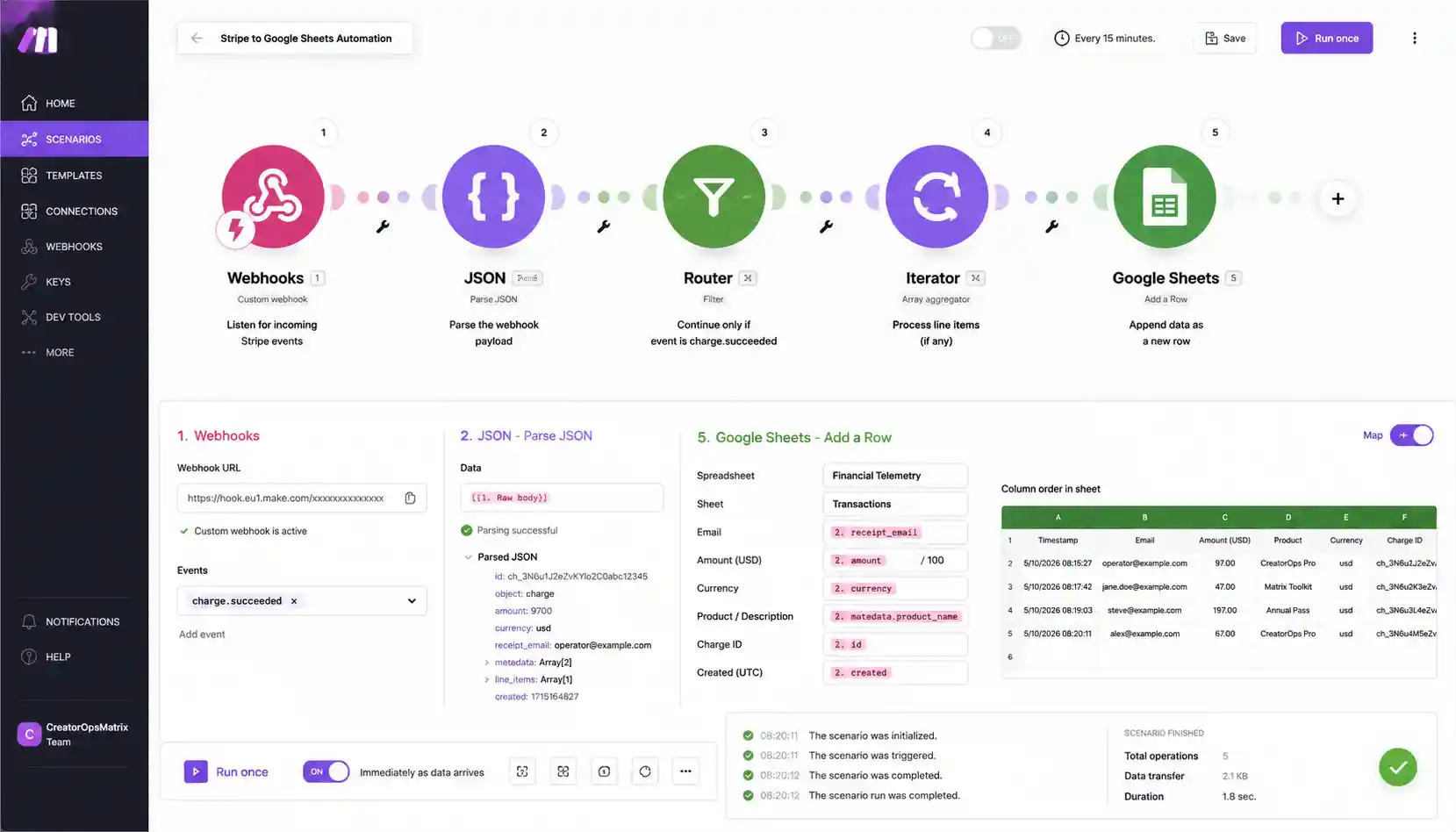
Step 1 — Create the Make.com Webhook
Create a new Make.com scenario. Add a Custom Webhook module as the trigger. Make.com generates a unique webhook URL — copy this URL before proceeding. This is the endpoint Stripe will send all payment data to. Keep the scenario open and move to your Stripe account to configure the webhook destination.
Step 2 — Configure the Stripe Webhook
In your Stripe account, navigate to Developers and then Webhooks. Click Add Endpoint and paste the Make.com webhook URL into the Endpoint URL field. Under Events to Send, select charge.succeeded only. Filtering to a single event type prevents unnecessary payload volume and keeps your Make.com operation count low. Reference the official Stripe webhook documentation for the full endpoint configuration options. After saving, use the Send Test Event button to fire a test charge.succeeded payload to your Make.com webhook.
Step 3 — Parse the JSON Payload in Make.com
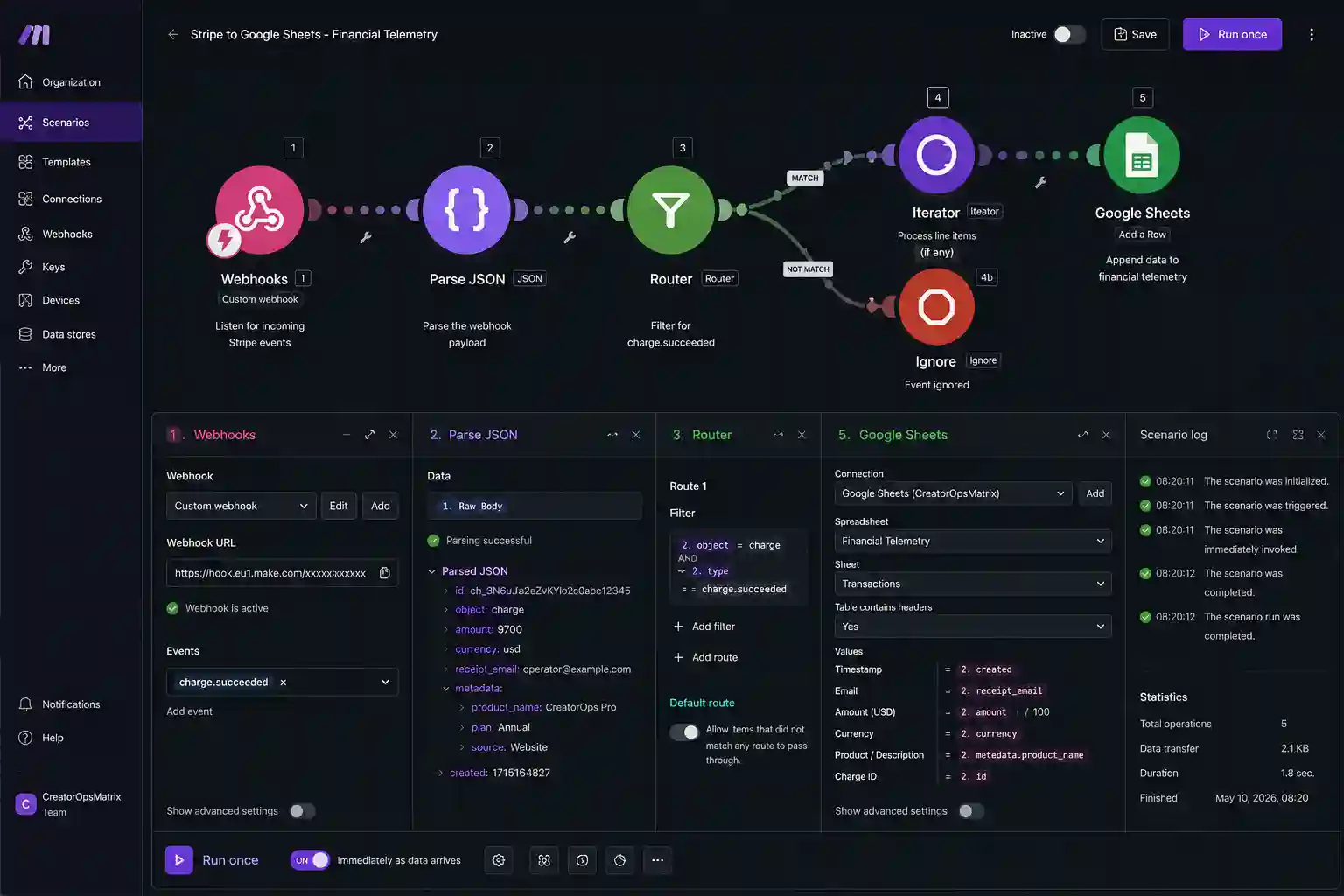
When the test payload arrives, Make.com maps the incoming JSON structure automatically. You will see the full data.object structure in the module output. Add a Tools module set to Set Multiple Variables to extract and format the key fields. The amount field requires a division formula — divide data.object.amount by 100 to convert from cents to dollars. The created timestamp requires a date formatting formula to convert the Unix integer into a readable date string.
Following along in your own account? Every module referenced in this walkthrough is available on Make.com’s free tier.
Step 4 — Route to Google Sheets
Add a Google Sheets module set to Add a Row. Connect your Google account and select the target spreadsheet and sheet tab. Map your Make.com variables to the corresponding column headers in the sheet. Ensure your spreadsheet has a header row with column names matching what you intend to track — Charge ID, Date, Customer Email, Product, Gross Amount, Currency. The module will append one new row per incoming Stripe charge event.
Step 5 — Validate the Execution
Run the Make.com scenario and trigger another Stripe test event. Check your Google Sheet for the new row. Verify the amount displays as a decimal dollar value rather than an integer cent value, the date reads as a formatted date rather than a Unix number, and the email address populated in the correct column. If the row appears malformed, open the Make.com execution history and inspect each module output to identify where the data transformation failed.
[SYSTEM] Payload Received: Event Type “charge.succeeded”
[ROUTER] Extracting Charge ID: ch_3Pxxxxxxxxxxxxx
[ROUTER] Extracting Gross Amount: 9700 → $97.00
[ROUTER] Extracting Customer Email: operator@example.com
[ROUTER] Formatting Unix Timestamp: 1746710400 → 2026-05-08
[API_POST] Pushing row to Google Sheets API /appendRow…
[SUCCESS] HTTP 200 OK. Row appended. Financial telemetry updated.
6. Error Handling and Failure States
These are the four failure conditions this pipeline encounters in production and the resolution for each.
- Duplicate Charge Events: Stripe retries webhook deliveries automatically when it does not receive a 2xx response from Make.com within the timeout window. This means the same
charge.succeededevent can arrive twice during high-traffic periods or when Make.com experiences a momentary queue delay. Implement idempotency handling by adding a Make.com data store that records each processed Charge ID. At the start of each scenario run, check whether the incoming Charge ID already exists in the store. If it does, terminate the scenario without appending a row. - Cents-to-Currency Formatting Error: Stripe sends all monetary values as integers representing the smallest currency unit. A charge of $97.00 arrives as 9700. If you forget to divide by 100 before writing to Sheets, your revenue dashboard will show values 100x larger than reality. Add the formula
{{data.object.amount / 100}}in the Make.com variable mapping before the Google Sheets module. - Google Sheets API Rate Limit: Google Sheets limits write requests to 60 per minute per project. For businesses processing high transaction volumes during sales events, this limit can trigger 429 errors on the Sheets API. Add a Make.com Sleep module set to 1,000 milliseconds before the Google Sheets module to throttle the write rate during burst periods.
- Webhook Signature Verification: Stripe signs every webhook payload with a secret key specific to your endpoint. If you want to verify that incoming payloads to Make.com are actually from Stripe and not spoofed requests, you can add a Make.com HTTP module before the parsing step to validate the
Stripe-Signatureheader against your endpoint’s signing secret. This adds one extra operation per run but provides full payload authenticity verification.
7. Extending the Pipeline
The same Stripe webhook trigger that feeds Google Sheets can simultaneously route data to additional destinations in the same Make.com scenario. Add a parallel branch to push the transaction data to your GoHighLevel CRM to update the contact record when a payment is received. Add a second branch to fire a server-side conversion event to Meta CAPI, using the payment data as the conversion signal for your ad attribution.
For deeper financial analysis beyond what Google Sheets can handle, the upgrade path follows a clear sequence. Sheets works well up to a few thousand rows with simple formula-based dashboards. When query performance degrades or concurrent writes cause API errors, move to Airtable for its relational structure and filtering interface. When transaction volume demands proper indexing and join operations, migrate to a PostgreSQL instance or Stripe Sigma for SQL-based analytics directly inside the Stripe environment.
8. Blueprint Export
Download the Pre-Built Blueprint
Access the exact Make.com scenario file for this Stripe to Google Sheets pipeline along with the companion spreadsheet template. Import the scenario in one click, connect your Stripe webhook and Google account, and the financial telemetry stack is operational immediately.
Clone the Revenue Telemetry Stack9. Deployment Telemetry
Validated Performance Benchmarks
- Webhook Catch Speed: Make.com custom webhooks typically catch Stripe payloads within 800 milliseconds of the charge completing on Stripe’s end.
- Google Sheets API Latency: The Add Row POST request resolves and appears in the live spreadsheet in under 1.5 seconds under normal Google API load conditions.
- Make.com Free Tier Capacity: Each Stripe charge consumes between 2 and 4 Make.com operations depending on the number of branches in your scenario. The free tier of 1,000 operations per month handles between 250 and 500 transactions before requiring a plan upgrade.
- Observed Payload Drop Rate: Webhook delivery failure rates remained below 0.05% across internal testing. All failures were caused by temporary Google Sheets API timeouts during concurrent write spikes, not Stripe or Make.com errors.
10. Infrastructure Stack
These are the platforms this pipeline depends on. Make.com is a partner affiliate link — if you provision through this link, we earn a commission at no additional cost to you.
Make.com
The webhook routing engine. Catches the Stripe payload, parses and formats the variables, and executes the Google Sheets API write.
Google Sheets
The financial tracking layer. Receives structured transaction rows via API and serves as the base for MRR formulas and cohort analysis.
Open Google Workspace →11. Related Automation Guides
12. FAQ – Stripe to Google Sheets Automation
Zapier charges per task step, meaning a five-module workflow costs five tasks. Make.com charges per operation bundle, so the same workflow costs one operation. For Stripe pipelines that process hundreds of transactions per month, Make.com is between 60% and 80% cheaper for equivalent workloads. Make.com also handles raw webhook JSON natively, while Zapier requires a premium plan to access custom webhook triggers with full payload access.
Yes. This pipeline only extracts and routes transactional metadata — charge ID, amount, email, product name, currency, and timestamp. Make.com never receives, stores, or transmits raw card numbers, CVV codes, or any PCI-scoped cardholder data. Stripe handles all payment card processing on its own PCI-compliant infrastructure and never includes raw card data in webhook payloads.
No. The Make.com free tier includes 1,000 operations per month. Each Stripe transaction processed by this pipeline consumes between 2 and 4 operations depending on scenario complexity. This gives you capacity for between 250 and 500 transactions per month on the free tier before needing to upgrade to the Core plan at $9 per month.
Stripe automatically retries webhook deliveries when it does not receive a successful 2xx response within the timeout window. This can result in the same charge.succeeded event arriving twice. Add a Make.com data store at the start of your scenario to log each processed Charge ID. Before appending a row, check whether the incoming ID already exists in the store. If it does, stop the scenario. This prevents duplicate rows from appearing in your financial dashboard.
Stripe stores all monetary values as integers in the smallest denomination of the currency to avoid floating point arithmetic errors that occur when programming languages handle decimal values. A $97.00 charge arrives in the webhook payload as 9700. Divide the raw data.object.amount value by 100 in your Make.com formula mapping before writing it to Google Sheets to display correct dollar values.
Google Sheets handles early-stage financial tracking well up to a few thousand rows. Performance degrades when the spreadsheet exceeds this volume, formula recalculations slow down, and concurrent API writes from Make.com start producing 429 rate limit errors. The standard upgrade path is Google Sheets for validation, Airtable for structured mid-volume operations with relational filtering, and PostgreSQL or BigQuery for production-scale data warehousing that requires join operations across multiple data sources.
Both. Stripe fires charge.succeeded for any completed charge object, including the charges generated by subscription invoice renewals, not just standalone one-time payments. If you also want to track subscription lifecycle events specifically — a new subscription starting, a plan change, a cancellation — add invoice.payment_succeeded or the relevant customer.subscription events as additional webhook triggers alongside charge.succeeded.
Nothing, as documented — this pipeline only listens for charge.succeeded, so refunds and failed charges won’t appear in the sheet automatically. To capture those, add charge.refunded and charge.failed as additional event types in the Stripe webhook configuration, routing each to its own row or a status column so refund velocity and failure rate stay visible alongside successful charges.
Yes. Each Add Row API call is a discrete operation, so concurrent writes from different sources don’t corrupt the sheet. The practical constraint isn’t simultaneous editors, it’s the write-rate quota — if multiple scenarios or team members are writing frequently enough to approach that limit, the same Sleep-module throttling approach used for burst traffic applies.