How to Launch a Skool Community: The $10k/Month Blueprint (2026)
Deployment Updated: July 2026Question: How do you build a profitable Skool community pipeline?
Quick Answer: To launch a Skool community that generates recurring revenue, configure three connected infrastructure layers: a Beehiiv email acquisition layer that converts content traffic into owned subscribers, a Stripe subscription billing layer that handles recurring payments, and a Make.com automation router that intercepts confirmed payment webhooks.
The router automatically provisions Skool community access within seconds of purchase, eliminating manual member management and creating a fully automated paywall pipeline.
Ready to start building? Every pipeline in this guide starts with the same first move — capturing owned email subscribers before you ever ask for payment.
Table of Contents
- 1. How to Launch a Skool Community: Why This Architecture Works
- 2. The MRR Model and Pricing Framework
- 3. The Three-Layer Execution Stack
- 4. Infrastructure Dependency Matrix
- 5. The Automation Pipeline Flow
- 6. Webhook Event Conditions
- 7. Failure Handling and Recovery
- 8. Pre-Deployment Validation Checklist
- 9. Frequently Asked Questions
1. How to Launch a Skool Community: Why This Architecture Works
Most operators who attempt to launch a paid Skool community make the same structural error: they set up the community first and then try to figure out how to fill it.
This sequence fails because Skool’s discovery mechanisms — the marketplace and the Skool Games promotional system — produce inconsistent traffic that cannot be relied on as a primary acquisition channel. The community environment is a retention mechanism, not an acquisition mechanism.
It keeps people who have already chosen to pay engaged with your content and community. It does not convert cold strangers into paying members.
The architecture documented here inverts this sequence. Distribution comes first. A Beehiiv newsletter captures email subscribers from content channels — YouTube, LinkedIn, organic search, or paid ads.
Those subscribers receive a structured nurture sequence that demonstrates value, establishes the operator’s authority, and presents the paid community upgrade. The Beehiiv-to-Skool transition is not a direct link — it is a payment confirmation webhook that runs through Make.com and provisions access automatically when Stripe confirms the subscription charge.
This architecture produces two outcomes that manual community management cannot achieve. First, every paying member receives Skool access within seconds of payment confirmation rather than hours or days, eliminating the post-purchase anxiety window where buyers second-guess their decision.
Second, the system handles subscription lifecycle events — renewals, cancellations, failed payments — without human intervention, maintaining accurate community access across every billing event automatically.
According to Skool’s community documentation, the platforms with the highest engagement rates are consistently those where members enter through a structured onboarding sequence rather than direct discovery. The Beehiiv nurture sequence — which pre-frames the community’s value before the member ever logs in — is the mechanism that produces this higher-engagement entry pattern.
2. The MRR Model and Pricing Framework
The $10,000 MRR target referenced in this guide is not arbitrary — it represents the inflection point where a Skool community becomes a sustainable primary revenue source rather than a supplementary income stream.
At $10,000 MRR, the community generates sufficient revenue to justify dedicated content creation time, a support operator, and ongoing infrastructure investment while producing meaningful net income for the operator.
The most common pricing mistake creators make when launching paid communities is underpricing to maximise accessibility. A community priced at $27 per month requires 370 paying members to reach $10,000 MRR. A community priced at $97 per month requires only 104 members.
The marketing effort to acquire 370 members is significantly greater than acquiring 104 — and lower-priced communities typically attract members with lower commitment levels, producing higher churn rates that require even more new member acquisition to maintain the same MRR.
Higher price points create a smaller, more committed member base that churn at lower rates and participate more actively, which is precisely what Skool’s engagement mechanics are designed to reward.
MRR Calculation Matrix
- $47/month × 213 members = $10,000 MRR — Entry price for content-only communities. High volume required. Churn risk higher.
- $97/month × 104 members = $10,088 MRR — The optimal price point. Outcome-based positioning. Most accessible path to target.
- $147/month × 68 members = $9,996 MRR — Premium tier. Requires demonstrated results and live coaching component.
- $297/month × 34 members = $10,098 MRR — High-ticket mastermind. Requires significant authority and exclusive access positioning.
The acquisition pipeline feeding this model requires a newsletter conversion rate of 2% from free subscriber to paid member at the $97 price point. At 2% conversion, 5,000 active subscribers produces 100 paying members.
At 4% — achievable with a highly targeted niche audience and a strong outcome-based offer — 2,500 subscribers produces the same result. List quality and offer specificity determine conversion rate more reliably than list size.
3. The Three-Layer Execution Stack
Three infrastructure layers are required to run this pipeline without custom code or manual intervention. Each layer has a single defined responsibility, and failure in any one layer has a specific, diagnosable impact on the pipeline.
Beehiiv
The audience capture and automated email nurture layer. Converts traffic into owned email subscribers and delivers the upgrade sequence.
Launch Newsletter →Skool
The community, course hosting, and recurring subscription paywall. Gamification drives daily active usage and reduces involuntary churn.
Provision Community →Make.com
The automation router connecting Stripe payment events to Skool access provisioning and Beehiiv subscriber tier management.
Configure Routing →4. Infrastructure Dependency Matrix
Understanding which layer each function depends on and what happens when that layer fails allows you to build appropriate redundancy and alerting before deployment rather than after a production incident.
| Layer | Primary Function | Failure Impact | Recovery Time |
|---|---|---|---|
| Beehiiv | Email subscriber acquisition and nurture sequences | Lead capture stops. Existing subscribers still receive scheduled content. | Platform uptime SLA — typically minutes to hours |
| Stripe | Subscription billing and payment webhook firing | Revenue interruption. Make.com receives no new webhook events. | Stripe retries failed webhooks for up to 3 days automatically |
| Make.com | Webhook routing, access provisioning, subscriber tagging | Paying members do not receive Skool access. Access revocations do not fire. | Stripe retries cover delivery. Requires error handler with manual fallback. |
| Skool | Community environment and course delivery | Members cannot access purchased content or community. | Platform uptime SLA — provisioned invitations queue and deliver when restored |
5. The Automation Pipeline Flow
The complete pipeline runs as follows: a subscriber in Beehiiv clicks the paid community upgrade link, lands on your Stripe-powered checkout page, and completes payment.
Stripe fires an invoice.payment_succeeded webhook to your Make.com endpoint. Make.com’s Router module branches the payload — one path sends a Skool community invitation to the customer’s email, a second path applies a “paid-member” tag in Beehiiv to segment that subscriber out of the free newsletter upgrade sequence.
Both paths execute simultaneously within seconds of the Stripe event arriving.
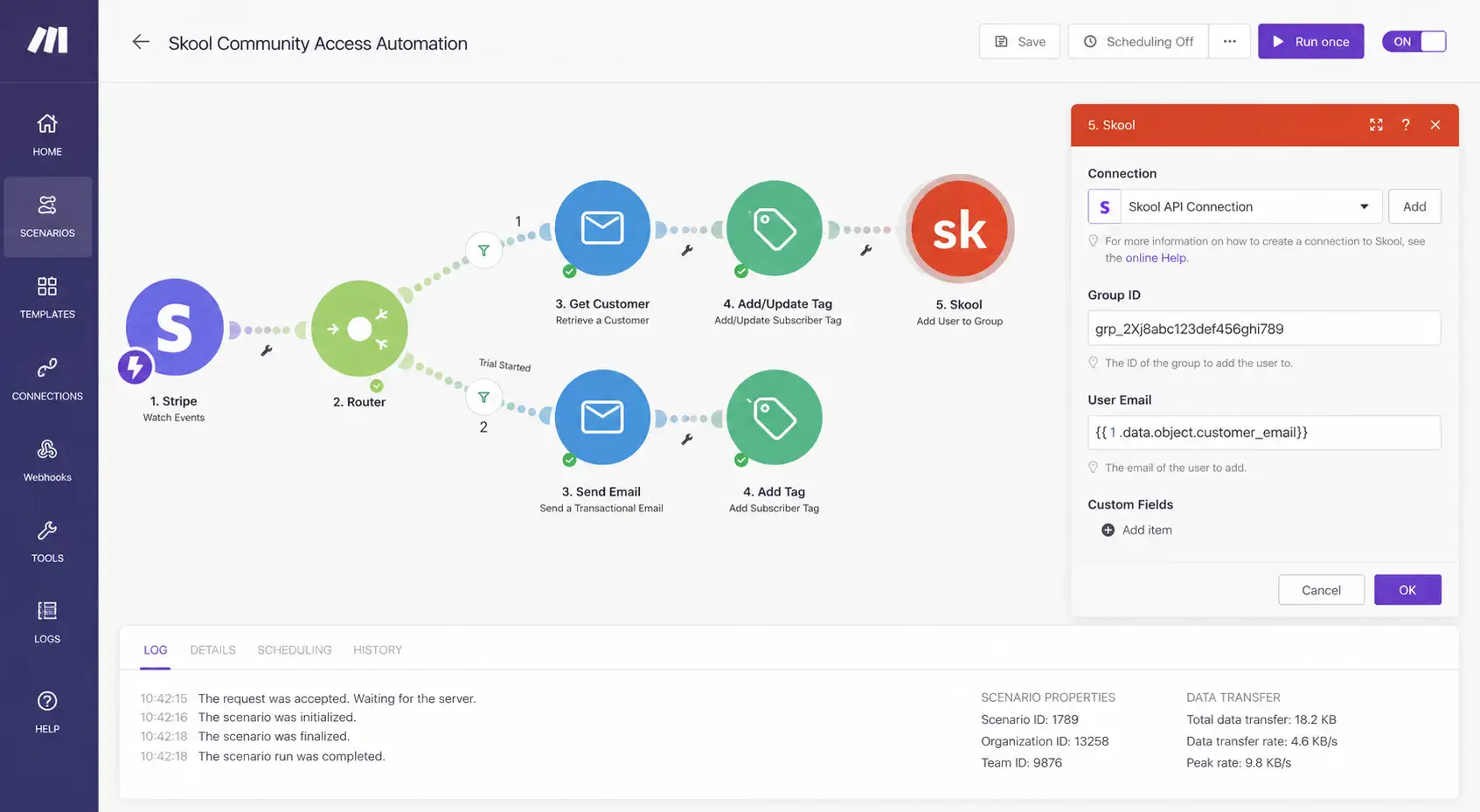
Production Make.com scenario validating Stripe webhook ingestion, Beehiiv subscriber tagging, and automated Skool access provisioning.
[ROUTER] Parsing customer email from billing_details…
[ROUTER] Validating subscription tier: community_monthly_97
[ACTION] Path A → Provisioning Skool community invitation…
[ACTION] Path B → Applying Beehiiv tag: paid_member_tier1
[SUCCESS] User synchronisation completed in 1.2 seconds.
The Make.com scenario requires a Webhooks module as the trigger, a Router module to branch the payload, a Skool module or HTTP call for invitation provisioning, and a Beehiiv module for subscriber tag management.
The complete Stripe webhook configuration — including which events to listen for and how to set up the endpoint URL in Stripe’s developer dashboard — is documented in our Make.com Stripe webhook guide.
6. Webhook Event Conditions
The Make.com Router must handle three distinct Stripe webhook events to maintain accurate community access state across the full subscription lifecycle.
A pipeline that only handles the initial payment but not renewals, cancellations, and failed payments will accumulate access inconsistencies over time — members whose subscriptions have lapsed retaining access, and members whose payments failed remaining in the community until manually audited.
| Stripe Event | Make.com Action | Beehiiv Action |
|---|---|---|
invoice.payment_succeeded | Grant Skool community invitation | Apply paid_member tag, remove upgrade_sequence tag |
customer.subscription.deleted | Revoke Skool access via API | Remove paid_member tag, re-add upgrade_sequence tag |
invoice.payment_failed | Send payment failure alert to Slack | Trigger dunning email sequence |
customer.subscription.updated | Log tier change to Airtable | Update subscriber custom field: subscription_tier |
Dunning sequence timing: Configure the invoice.payment_failed triggered dunning sequence in Beehiiv to send three recovery emails over seven days before Make.com revokes Skool access.
Stripe’s built-in Smart Retries will attempt automatic payment recovery multiple times over a configurable window (the default recommended schedule is around 8 attempts over 2 weeks).
Coordinate the dunning email timing with your configured Stripe retry schedule so members receive a payment failure notification before the automatic retry fires — reducing support tickets from members confused by unexpected payment attempts.
7. Failure Handling and Recovery
The most operationally dangerous failure in this pipeline is a Make.com scenario execution error that causes a paying member to not receive Skool access. The member’s payment has cleared, they have received a payment confirmation email from Stripe, and they expect immediate community access.
If access provisioning fails silently, the next interaction you have with that member is their support ticket — a damaging post-purchase experience that increases refund requests and reduces first-week engagement.
Prevent this by attaching an error handler module to the Skool provisioning step in your Make.com scenario. Configure the error handler to send an immediate Slack message or email alert containing the customer email, subscription tier, and Stripe charge ID whenever the provisioning step fails.
This allows manual access provisioning within minutes rather than discovering the failure when the member contacts support hours later.
For the data warehousing layer, log every successful and failed webhook event to an Airtable base with columns for timestamp, customer email, event type, and execution status.
This provides an audit trail for manually identifying and recovering any members who experienced access gaps during platform downtime or scenario execution failures. The Stripe-to-Airtable logging pattern is documented in our real-time Stripe dashboard guide.
8. Pre-Deployment Validation Checklist
Beehiiv setup and sending domain authentication: 15 minutes
Stripe webhook endpoint configuration: 20 minutes
Make.com scenario build and Router configuration: 15 minutes
Skool community setup and onboarding category: 10 minutes
Testing and validation with Stripe test mode: 15 minutes
Total: approximately 75 minutes to production deployment
[CHECK] Make.com scenario is activated — not paused or in draft mode.
[CHECK] Beehiiv sending domain authenticated and DNS propagation confirmed.
[CHECK] Skool community onboarding category and first post configured.
[CHECK] Error handler module attached to Skool provisioning step with Slack alert.
[CHECK] All three Stripe event types tested with Stripe test mode (4242 4242 4242 4242).
[CHECK] Beehiiv subscriber tagging verified against test subscriber record.
[CHECK] Dunning email sequence timing coordinated with Stripe retry schedule.
[SUCCESS] Community monetisation stack ready for production deployment.
Download the Complete Paywall Logic
Stop manually adding members to your community. Access the exact Make.com scenario blueprint to automate your Stripe-to-Skool recurring revenue pipeline — import in one click.
Access the Reference Blueprint →Related Automation Infrastructure
9. FAQ – How to Launch a Skool Community
Skool merges community forums, course hosting, and gamification mechanics — points, leaderboards, and levels — into a single interface. Members return daily to engage with the community feed rather than only accessing course content when they remember to log in. This combination drives daily active usage rates that isolated course platforms cannot replicate, significantly reducing involuntary churn among members who disengage from passive video libraries.
Yes. Beehiiv and Skool do not have a native direct integration. To build a pipeline where a Stripe payment confirmation triggers Skool access provisioning and Beehiiv subscriber tier tagging simultaneously, a workflow automation layer is required. Make.com handles this with native modules for both platforms and a Router module that branches the Stripe webhook payload to multiple simultaneous execution paths from a single trigger event.
The most direct path to $10,000 MRR on Skool is 104 engaged members paying $97 per month for outcome-based group coaching with a live weekly call component rather than passive video content. Outcome-based offers command higher price points and retain members longer than content libraries. The acquisition mechanism that most reliably converts newsletter subscribers to paid members at this price point is a live weekly group coaching call that provides direct operator access unavailable in the free newsletter tier.
The complete pipeline takes approximately 75 minutes for an operator familiar with webhook configuration. Beehiiv setup and domain authentication takes 15 minutes. Stripe webhook routing configuration takes 20 minutes. Make.com scenario build with Router module takes 15 minutes. Skool community setup and onboarding takes 10 minutes. Testing and validation using Stripe test mode takes 15 minutes. First-time operators unfamiliar with webhook concepts should budget 2 to 3 hours including the learning curve.
Configure the Make.com scenario to receive four Stripe events for complete subscription lifecycle management. invoice.payment_succeeded triggers Skool access grant and Beehiiv paid-member tagging. customer.subscription.deleted triggers Skool access revocation and premium tag removal. invoice.payment_failed triggers a dunning email sequence in Beehiiv. customer.subscription.updated logs tier changes for audit purposes. Each event requires a separate Router path in the Make.com scenario.
Configure an error handler module on the Skool provisioning step in Make.com that sends an immediate Slack or email alert with the customer email, subscription tier, and Stripe charge ID when provisioning fails. This enables manual access grant within minutes rather than discovering the failure when the member submits a support request. Stripe automatically retries failed webhook deliveries with exponential backoff for up to three days, so the scenario will typically receive the event again — but the manual fallback ensures no paying member waits while retries are in progress.
The $97 to $147 per month range represents the highest-volume pricing sweet spot for most coaching communities. At $97, you need 104 members to reach $10,000 MRR. Communities at this price point attract committed members who participate actively, which is precisely what Skool’s gamification mechanics reward. Lower price points require significantly more members to reach the same MRR target, and the lower commitment threshold typically produces higher churn rates that offset the volume advantage.
At a 2% conversion rate from free newsletter subscriber to paid community member — a realistic baseline for a well-positioned offer to an engaged list — you need 5,000 active subscribers to reach 100 paying members at $97 per month. At 4% conversion, which is achievable with strong niche alignment and demonstrated outcomes, 2,500 subscribers produces the same result. List quality and offer specificity determine conversion rate more reliably than list size — a targeted list of 1,000 highly relevant subscribers frequently outperforms a broad list of 10,000.