Auto Publish AI Content to WordPress (2026 Guide)
Deployment Updated: July 2026Question: How do you auto publish AI content to WordPress?
Quick Answer: To auto publish AI content to WordPress, map a Google Sheets keyword list to a Make.com trigger. Pass each keyword into the OpenAI API with an HTML-enforcing system prompt to generate formatted article content, then route that output into the WordPress REST API module to create a published or draft post automatically.
Building this pipeline today?
Make.com’s Core plan runs a full 200-article cluster comfortably within its operation limits.
1. Why Content Velocity Is the Core SEO Variable
Search engine rankings are determined by a combination of authority signals, relevance matching, and topical coverage depth. The third variable — topical coverage — is where automated publishing pipelines produce their most measurable impact. A site that publishes 200 articles covering every variation of a keyword cluster signals to search algorithms that it owns the topic. A site that publishes 10 manually written articles on the same cluster, regardless of individual article quality, covers less surface area and ranks for fewer search queries.
The constraint on topical coverage has historically been human writing capacity. A skilled writer producing 2,000-word articles takes 3 to 5 hours per piece. At that rate, covering a 200-keyword cluster requires between 600 and 1,000 hours of writing time — months of full-time output before a single article from the later batches begins receiving organic traffic. An automated pipeline running the same keyword list through a language model and the WordPress REST API covers the entire cluster in hours, not months.
The concern operators consistently raise about this approach is content quality and search penalty risk. Google’s helpful content system targets spammy, repetitive, and information-poor content — not content produced with a particular tool. An article that contains specific data points, accurate technical detail, and useful information for the reader passes the helpful content assessment regardless of how it was produced. The system prompt that instructs the language model is the quality control mechanism. A poorly written prompt produces poor content. A rigorously engineered prompt that specifies structure, enforces factual accuracy requirements, and prohibits generic filler produces content that meets the same quality threshold as manually written material.
Cost benchmark: Using GPT-4o Mini at current OpenAI pricing, a 1,500-word HTML article costs between $0.02 and $0.05 in API compute. A 200-article cluster costs between $4 and $10 in total token spend. The Make.com operations cost across the same run is negligible on the Core plan.
2026 has introduced a second audience for published content beyond search engine crawlers: AI answer engines like ChatGPT, Claude, and Perplexity that cite and summarize web content directly in their responses — a discipline increasingly referred to as Generative Engine Optimization (GEO). The same system prompt that enforces clean HTML structure and factual specificity for Google’s helpful content system also tends to produce content that AI answer engines can parse and cite cleanly — direct-answer paragraphs, clear entity names, and specific data points serve both audiences simultaneously. Nothing in this pipeline needs to change structurally to serve both; it’s a reason to keep the prompt strict, not a reason to build a second pipeline.
2. How the Pipeline Architecture Works
The pipeline runs across three stages. The trigger stage reads a keyword from a Google Sheets row and passes it as a variable into the generation stage. The generation stage sends the keyword to the OpenAI API alongside a system prompt that specifies the article structure, enforces HTML output formatting, defines the target word count, and prohibits markdown syntax. The output stage takes the raw HTML string returned by OpenAI and routes it into the WordPress REST API to create the post record in the WordPress database.
The Google Sheets trigger is the control interface for the entire operation. Each row in the spreadsheet represents one article. Adding a keyword to a new row and setting a status column to “Publish” or “Queue” activates the Make.com scenario for that row. This gives operators full visibility into what has been published, what is pending, and what is queued for the next scheduled run — without needing to access the Make.com interface directly during production.
The WordPress REST API accepts a JSON payload containing the post title, content body, status, category, tags, and featured media ID. Because the OpenAI module outputs a string of HTML directly, no additional formatting conversion is required between the generation step and the WordPress injection step. The HTML maps directly into the content field of the API payload. This is the primary reason HTML output must be enforced in the system prompt — WordPress renders the content field as-is. Markdown symbols passed into the content field appear as literal characters in the published post rather than as formatted output.
3. Data Flow Architecture
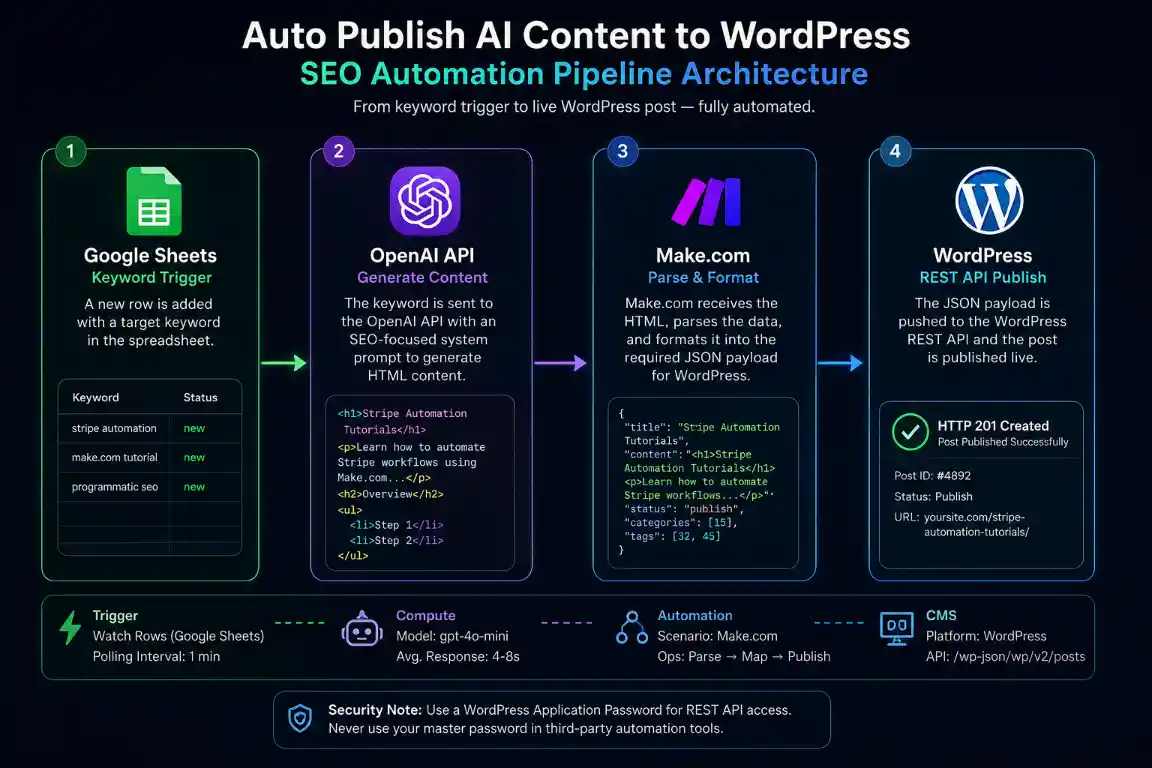
Programmatic SEO pipeline: Google Sheets keyword trigger → OpenAI HTML generation → WordPress REST API post creation.
Keyword Row Added
Generate HTML Article
Parse and Format JSON
REST API Post Created
4. API Cost and Infrastructure Comparison
These are the per-article cost benchmarks across the current generation of language models available via API as of 2026.
| Model | Cost per 1,500-Word Article | Best Use Case |
|---|---|---|
| GPT-4o Mini | $0.02 — $0.05 | Bulk topical coverage, long-tail keywords |
| GPT-4o | $0.40 — $0.80 | High-competition keywords requiring depth |
| Claude Haiku 4.5 | $0.01 — $0.03 | Maximum volume at lowest cost per article |
| Claude Sonnet 4.6 | $0.25 — $0.50 | Balanced quality and cost for mid-tier clusters |
5. Deployment Logic
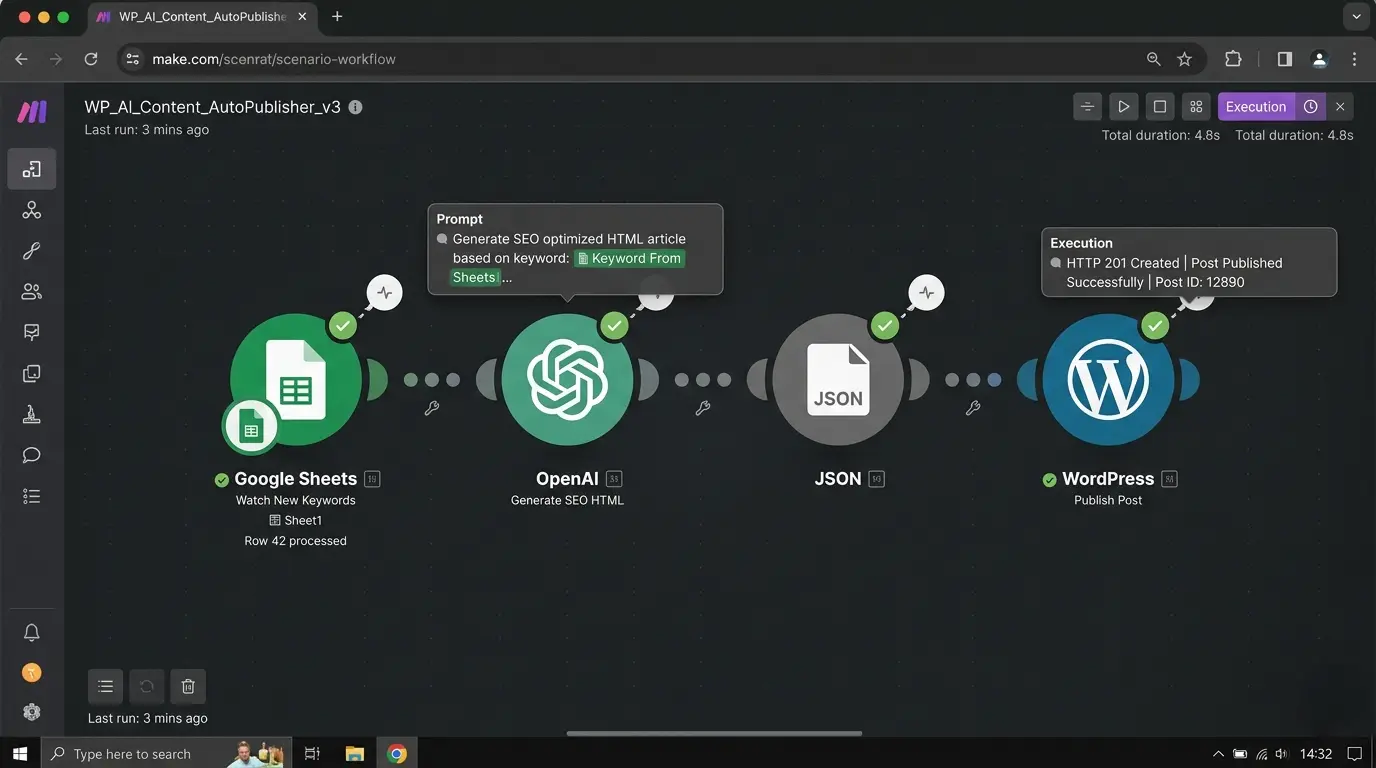
Live Make.com scenario routing keyword data from Google Sheets through OpenAI to the WordPress REST API.
Step 1 — Configure the Google Sheets Trigger
Create a new Make.com scenario. Add a Google Sheets module set to Watch Rows. Connect your Google account and select the spreadsheet containing your keyword list. Set the trigger column to the cell where keywords are entered. Add a filter on the status column so the scenario only activates for rows marked as ready — this prevents partial rows from triggering a generation run mid-entry.
Step 2 — Build the OpenAI System Prompt
Add an OpenAI module set to Create a Completion. Select your model — GPT-4o Mini for bulk runs, GPT-4o for competitive keywords. In the System content field, write your article generation prompt. The prompt must specify the following explicitly: return only valid HTML using h2, h3, p, ul, li, and strong tags; never use markdown syntax including asterisks, pound signs, or backticks; include a minimum word count; and structure the article around the exact keyword passed in the user message field. Map the keyword variable from the Google Sheets module into the User content field.
Step 3 — Map the WordPress REST API Payload
Add a WordPress module set to Create a Post. Connect your WordPress site using the REST API URL format: https://yourdomain.com/wp-json/wp/v2/posts. For authentication, use an Application Password generated in your WordPress user profile — not your admin login password. Map the OpenAI output text variable into the Content field. Set the Status field to draft for human review before publication, or publish for fully automated live posting. Map the keyword variable into the Title field with any formatting adjustments needed.
Step 4 — Map SEO Meta Fields in the Same Call
Most auto-publish pipelines stop at title and body, leaving the meta description blank for someone to fill in manually later — which defeats part of the point of automating in the first place. Add a second instruction to your OpenAI system prompt requesting a 150-character meta description alongside the article body. If you run Yoast SEO, enable its REST API field exposure and map the description into the yoast_head_json custom field structure. If you run RankMath, its own REST endpoints expose an equivalent meta field. Either way, the description is set in the same API call that creates the post, not as a follow-up task.
Step 5 — Add Featured Image Automation
Insert an additional module before the WordPress post creation step. Use an Unsplash API module or a DALL-E 3 image generation module to produce a relevant image URL based on the article keyword. Pass the returned image URL into a WordPress Upload Media module to create the attachment in your media library. Map the returned media ID into the Featured Media parameter of the Create Post module.
Following along in your own account?
Every module in this walkthrough runs on Make.com’s free or Core tier.
Step 6 — Ping IndexNow After Publishing
Once a post is live, waiting for a search engine’s next scheduled crawl to discover it adds unnecessary lag. IndexNow is a protocol supported by Bing and other participating search engines that lets you notify them the moment a page is published or updated. Add an HTTP module immediately after the WordPress post creation step that sends a POST request to the IndexNow API with your new post’s URL and your site’s IndexNow key. This doesn’t guarantee faster ranking, but it removes the discovery delay entirely on supporting engines.
Step 7 — Validate and Test
Run the scenario manually with a single test keyword. Check the WordPress dashboard for the new post and verify the content renders as formatted HTML, the featured image is set, the meta description populated in your SEO plugin, the post is assigned to the correct category, and the title matches the keyword. If the content appears as raw markdown symbols, your system prompt is not enforcing HTML output — revise the prompt and run another test before activating the scheduled trigger.
[SYSTEM] Extracted Keyword: “Stripe Webhook Automation Tutorial”
[SYSTEM] Status Column: PUBLISH — activating scenario
[API_POST] Pushing prompt payload to OpenAI (Model: gpt-4o-mini)…
[ROUTER] Awaiting HTML generation… 5,800ms elapsed.
[ROUTER] Output length: 1,847 words. HTML structure validated.
[API_POST] Injecting payload to wp-json/wp/v2/posts…
[SUCCESS] HTTP 201 Created. Post ID: #4892. Status: published.
[API_POST] Pinging IndexNow with new post URL…
[SUCCESS] HTTP 200 OK. IndexNow notified.
6. Error Handling and Failure States
These are the four errors this pipeline produces in production and the resolution for each.
- WordPress 401 Unauthorized: Make.com is authenticating with your standard WordPress admin password rather than an Application Password. Navigate to Users in your WordPress dashboard, open your user profile, scroll to Application Passwords, create a new one with a descriptive name like “Make.com API”, and use that generated string — including the spaces — in your Make.com WordPress module authentication settings.
- OpenAI 504 Gateway Timeout: Long-form article generation for outputs over 2,000 words frequently exceeds the default Make.com module timeout. In the OpenAI module settings, locate the timeout configuration and increase it to the maximum allowed value. Add an error handler on the OpenAI module set to Resume with a retry attempt to automatically reattempt generation if the first request times out.
- Markdown Rendering as Raw Text: If the published WordPress post shows asterisks, pound signs, or backtick characters in the body text, the language model returned markdown instead of HTML. Add an explicit prohibition in your system prompt: “Return only valid HTML. Never use markdown syntax. Do not use asterisks, pound signs, or backticks anywhere in the output.” Run a new test generation to verify compliance before resuming bulk execution.
- Database Overload on Bulk Runs: Publishing 50 or more articles in a single scenario run sends simultaneous write requests to your WordPress database. Entry-level shared hosting environments cannot handle this concurrent load and will return 500 errors or cause database connection failures. Add a Make.com Sleep module set to 5,000 milliseconds between each WordPress post creation to throttle the write rate. For bulk runs over 100 articles, use a VPS or managed WordPress hosting with a dedicated database.
7. Extending the Pipeline
Once the WordPress post is created and returns an HTTP 201 response with the new Post ID, split the Make.com scenario into parallel branches. One branch can extract the published post URL from the API response and send it to a social scheduling tool for immediate distribution. A second branch can write the Post ID, URL, and publication timestamp back to the Google Sheets row to update the status column from “Publish” to “Live” — giving you a complete audit trail of every article in the pipeline without leaving the spreadsheet.
For operators running this pipeline alongside their ad attribution stack, the same keyword that triggers article generation can also be used to tag UTM parameters in the published URL. This allows you to track which programmatically published articles drive conversion events through your server-side attribution system, closing the loop between content investment and revenue attribution. See our no-code AI agents guide for extending this pipeline into a fully autonomous research-to-publish workflow.
8. Blueprint Export
Download the Complete Publishing Blueprint
Access the exact Make.com scenario file for this pipeline along with the production system prompt template used for HTML-enforced article generation. Import the scenario in one click, add your API credentials, and the pipeline is operational immediately.
Deploy the Exact Make.com Blueprint →9. Deployment Telemetry
⚡ Validated Performance Benchmarks
- API Compute Cost: GPT-4o Mini costs between $0.02 and $0.05 per 1,500-word article at current OpenAI pricing. A 200-article cluster costs between $4 and $10 in total API spend.
- Generation Latency: Make.com waits between 4 and 8 seconds for the OpenAI generation to complete before passing the HTML output to the WordPress module. This varies based on model selection and article length.
- WordPress API Response Time: Post creation via the REST API resolves in under 1.5 seconds under standard hosting conditions.
- Database Stability Threshold: Entry-level shared hosting begins producing 500 errors at concurrent write loads above 10 simultaneous requests. Use a Sleep module between iterations for bulk runs and upgrade to a VPS environment for production-scale execution.
10. Infrastructure Stack
These are the platforms this pipeline depends on. Make.com is a partner affiliate link — if you provision through this link, we earn a commission at no additional cost to you.
Make.com
The routing engine. Triggers from Google Sheets, passes keywords to OpenAI, and routes the HTML output to the WordPress REST API.
Deploy Make.com →OpenAI API
The content generation layer. Receives the keyword and system prompt, returns structured HTML ready for direct WordPress injection.
Access OpenAI API →11. Related Automation Guides
12. FAQ – Auto Publish AI Content to WordPress
Google’s helpful content system targets content that is spammy, repetitive, or provides no genuine value to the reader — not content produced with a particular method. An article that contains specific data, accurate technical detail, and useful information passes the helpful content assessment regardless of production method. A rigorously engineered system prompt that enforces original structure, prohibits filler sentences, and requires specific factual content produces output that meets the same quality standard as manually written material.
Yes. Make.com authenticates with the WordPress REST API using an Application Password — a separate credential generated in your WordPress user profile that is entirely isolated from your admin login. Your master password is never transmitted to or stored by Make.com. You can revoke the Application Password at any time from your WordPress user settings without affecting your admin access.
Add a module before the WordPress Create Post step — either an Unsplash API call using the keyword as the search query, or a DALL-E 3 image generation call. Pass the returned image URL to a WordPress Upload Media module, which uploads the image and returns a Media ID. Map that Media ID into the Featured Media parameter of the WordPress Create Post module to set the thumbnail automatically for every published article.
A 401 Unauthorized error means Make.com is using your standard WordPress admin password rather than an Application Password. Go to your WordPress dashboard, open Users, edit your profile, scroll to the Application Passwords section, and generate a new password with a label like “Make.com API”. Copy the full generated string including spaces and paste it into the Password field in your Make.com WordPress module connection settings. Do not use your regular login password.
Include explicit formatting instructions in your system prompt. State that the model must return only valid HTML using h2, h3, p, ul, li, and strong tags. State that it must never use markdown formatting including asterisks, pound signs, or backticks anywhere in the output. Add a final instruction to return nothing except the HTML body content — no preamble, no explanatory text, no code fences. Test with a single keyword run and inspect the raw output in Make.com’s execution history before activating bulk scheduling.
For articles over 1,500 words, OpenAI’s response time can exceed Make.com’s default module timeout. In the OpenAI module advanced settings, locate the timeout configuration and increase it to its maximum allowed value. Add an error handler on the OpenAI module — right-click the module and select Add error handler — set it to Resume with a second attempt. This automatically retries the generation once before failing the scenario run.
Yes, if the WordPress REST API is extended to accept SEO plugin fields. Yoast SEO exposes meta fields through its REST API integration once enabled, and RankMath does the same via its own REST endpoints. Add a second field to your OpenAI system prompt requesting a 150-character meta description alongside the article body, then map that output into the corresponding Yoast or RankMath custom field in the same WordPress API call, rather than leaving it blank for manual entry later.
Yes. IndexNow is a protocol supported by Bing and other participating search engines that notifies them immediately when a page is published or updated, rather than waiting for the next crawl cycle. Adding an HTTP module after the WordPress post creation step to ping the IndexNow API with the new post URL can meaningfully shorten the time between publishing and initial indexing on supporting engines.
Ready to Automate Your Content Pipeline?
Start on Make.com’s free tier — everything in this guide, including the IndexNow ping, runs comfortably within the free operation allowance for testing.
Start Free on Make.com →