Hyros Alternative 2026: Make.com DIY Server-Side Tracking vs Hyros
Can Make.com replace Hyros?
Only in part. Make.com can run the event-transport layer of a server-side setup: receive verified payment webhooks, capture attribution identifiers, hash eligible customer data and route conversion events to ad platform APIs such as the Meta Conversions API. It does not natively reproduce a managed attribution platform’s identity resolution, multi-touch modelling, reporting, onboarding or support.
Make.com vs Hyros: What Are You Actually Buying?
| Make.com DIY | Hyros | |
|---|---|---|
| Event transport | Build yourself | Managed |
| Attribution | Build/assemble | Included |
| Identity resolution | Build/assemble | Included |
| Reporting | Build/assemble | Included |
| API maintenance | You | Vendor |
| Setup | You | Vendor/team |
| Flexibility | Very high | Product-defined |
| Software cost | Lower entry point | Higher |
| Engineering responsibility | High | Lower |
Make.com is not a like-for-like replacement for Hyros. Make is an automation layer you assemble and maintain; Hyros and Cometly are managed attribution products. Choose based on which layers of the stack you need (see section 4).
See the Make.com workflow
Receive payment webhooks, transform conversion data and route events to ad platform APIs.
Table of Contents
- 1. Pricing snapshot
- 2. What Hyros provides
- 3. What Make.com can and cannot replace
- 4. The four layers of tracking
- 5. Why browser-based signals can go missing
- 6. Build the server-side pipeline
- 7. Meta CAPI vs Google measurement
- 8. Make vs Hyros vs Cometly
- 9. When Make.com is not enough
- 10. Choosing your Hyros alternative
- 11. FAQ
- 12. Sources & documentation
1. Pricing Snapshot — Reviewed October 7, 2026
| Platform | Published starting point | Notes |
|---|---|---|
| Make Free | 1,000 credits/month | Good for testing a low-volume scenario |
| Make Core | $12/month monthly billing or $9/month annual billing for 10,000 credits | Credit-based pricing; actual cost depends on plan, billing frequency and usage. |
| Make Pro | $21/month monthly billing or $16/month annual billing for 10,000 credits | Priority execution, custom variables and full-text execution-log search. |
| Make Teams | $38/month monthly billing or $29/month annual billing for 10,000 credits | Teams, team roles and scenario-template sharing. |
| Hyros | Currently displayed at $230/month for up to $20,000 tracked monthly revenue | One main product with pricing tied to tracked monthly revenue. Pricing and promotional offers can change, so verify the live Hyros pricing page before purchasing. |
| Cometly | Core and Enterprise; usage-based pricing | Pricing is tailored to monthly website pageviews and usage. Core includes attribution, server-side tracking and Conversion API; Enterprise adds advanced data/warehouse features. |
Prices and packaging change. Verify directly on Make, Hyros and Cometly before purchasing.
Make now uses credits as its billing unit. An operation is an individual module activity performed during a scenario run. For most standard non-AI apps, 1 operation uses 1 credit, but some AI and advanced features use credits dynamically based on factors such as tokens, file size, page count or processing time. For this server-side tracking workflow, estimate usage from the actual modules and data processed, rather than assuming every Make feature has the same credit behavior.
Make scenarios stop running when the available credits are exhausted. Incoming webhooks can remain queued subject to the webhook queue allowance, and scenarios resume after credits are added. Paid plans can purchase extra credits, and Make currently applies a 25% additional cost to extra credits whether they are purchased manually or through auto-purchasing. Make’s credit allocation also affects usage allowances such as data transfer, storage and webhook queue capacity, so high-volume server-side tracking should be evaluated on more than credits alone.
2. What Hyros Provides
Hyros is a managed attribution platform, not just a tracking script. Its scope covers event collection and server-side tracking, attribution across ad platforms, reporting dashboards, managed setup and onboarding, integrations, platform maintenance, and AI-assisted account analysis.
For operators running paid traffic across several platforms who want managed infrastructure and support, those capabilities are part of the Hyros offering. A DIY pipeline addresses a narrower requirement: building and maintaining the event-routing layer yourself.
3. What Make.com Can and Cannot Replace
Make.com can handle
- Receiving payment-success webhooks
- Normalising and hashing eligible identifiers
- Routing events to Meta and other ad APIs
- Writing an audit record of each event
- Low software entry cost for small workflows
- Custom webhooks and connectors for sources like Stripe, Shopify and GoHighLevel
You must build or own
- Multi-touch attribution and identity resolution
- A reporting dashboard (it lives wherever you send data)
- Updates when ad platform API schemas change
- Monitoring, retries and diagnostics
- Privacy and consent configuration
- No managed attribution support for your custom workflow; your team owns the logic and maintenance
The trade-off: a DIY Make workflow can have a lower software entry cost than a managed attribution platform, but that does not mean it has a lower total cost of ownership. You still own implementation, testing, monitoring, API changes, privacy controls, incident response and ongoing maintenance.
4. The Four Layers of Tracking
Browser, landing page, checkout and click IDs.
Stripe → webhook → Make → Meta CAPI. This is where Make primarily operates.
Event matching, deduplication and reporting.
Multi-touch models, identity resolution and cross-channel analysis.
Make primarily serves the event-transport/orchestration layer and can support parts of measurement if you build the storage, reporting and logic yourself. Hyros and Cometly provide managed measurement and attribution capabilities on top of the event data.
5. Why Browser-Based Conversion Signals Can Go Missing
Browser pixels depend on the visitor’s device. Browser restrictions, consent choices, cookie limits and ad blockers can stop some events from reaching an ad platform. The share varies by audience, browser mix and implementation, so measure it on your own traffic rather than assuming a fixed percentage.
Meta’s Conversions API lets you send events from your own server or server-side infrastructure alongside the pixel. Server-side tracking reduces dependence on browser execution for event delivery, but it does not recreate click identifiers, consent signals or customer information that were never captured. For the broader architecture, see our attribution systems hub and pixel vs server-side guide.
6. Build the Server-Side Pipeline
Hashing is a security and formatting step, not a substitute for a legal basis, consent requirement, platform policy or data-processing agreement. Only send customer information to an advertising platform when you have the appropriate permission and legal basis to do so.
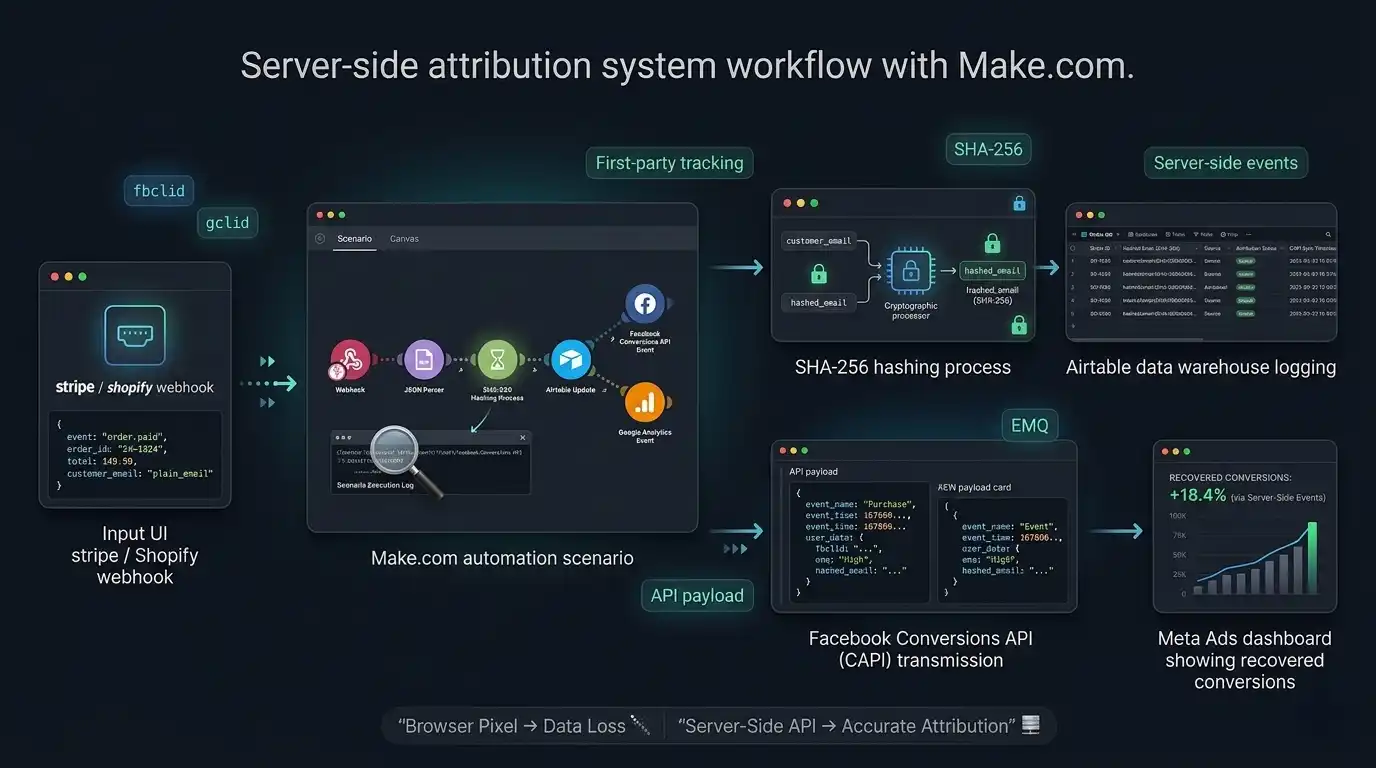
Example Make.com scenario: verified Stripe webhook → hashing → Meta Conversions API.
Step 1: Receive the Stripe event in Make
For a standard Stripe-to-Make workflow, use Make’s native Stripe → Watch Events instant trigger when it supports the event and account configuration you need. Make automatically creates the underlying webhook when the instant trigger is configured.
Use a Custom Webhook instead when you need a generic webhook endpoint, a non-standard source, or a custom ingress architecture. In either case, make sure the incoming event is authenticated before it can trigger a business-critical conversion action.
Choose the Stripe event that represents your actual conversion and revenue source. For PaymentIntent-based payments, payment_intent.succeeded is a common successful-payment event. Checkout, subscriptions, invoices and other payment architectures may require a different event, so the conversion event should match the business’s actual fulfillment and revenue logic.
Verify before acting. Stripe requires signature verification using the Stripe-Signature header, your webhook signing secret and the original raw request body. Do not parse or modify the raw payload before verification. For a production workflow, use Make’s native Stripe trigger where appropriate, or place signature verification in a trusted verification layer before a generic Make Custom Webhook. Never send a conversion or trigger a business-critical action from an unverified Stripe request.
Step 2: Deduplicate and guard against repeats
Store the Stripe event ID or another stable transaction ID and check it before processing. The same successful payment must never produce multiple conversion records, because webhooks can be delivered more than once.
Step 3: Capture identifiers, then normalise and hash
Read the click information you preserved through checkout (hidden field, session, or payment metadata). Prefer the original _fbc and _fbp values when captured. Where you derive fbc from fbclid, use fb.1.TIMESTAMP.FBCLID with the click-capture timestamp, not the purchase timestamp.
For email, lowercase, trim whitespace, then SHA-256 hash it. Send only data you are permitted to send. See our match quality guide for the full normalisation rules.
Step 4: Store an audit record
Log the transaction ID, order value, hashed email, click ID, timestamp and product to Airtable or a database. This reduces manual entry and gives you a traceable log, but it can only preserve identifiers you actually captured. At higher volume, a database or warehouse becomes more appropriate than Airtable.
Step 5: Send the event to Meta CAPI
Add an HTTP module that POSTs to the Events endpoint. Include event_id, event_source_url, event_name (Purchase), event_time, action_source (website), hashed em, fbc/fbp, user_data, and custom_data with value and currency. For website events, include the applicable event-source URL and user-data fields that you actually captured and are permitted to send. Do not invent browser identifiers after the fact.
When the same conversion is sent through both the browser Pixel and Meta CAPI, use the same event_name + event_id pair for both copies. For purchases, a stable transaction/order identifier is a practical choice. If the event is server-only, browser/CAPI deduplication does not apply. See CAPI deduplication.
Meta currently lists Graph API v26.0 as the latest Graph API version. Versioned APIs change and eventually expire, so verify the current version before production deployment.
Step 6: Test and validate
Run a Stripe test event, then use Meta’s Test Events tool (a test_event_code can be added to the payload). Check that the event ID deduplicates against the pixel, value and currency match the real order total, Event Match Quality is reasonable, and failures are logged and retried.
Illustrative flow only, not a captured production log.
Recovery varies by audience, geography and click-ID capture, so don’t rely on universal percentages. Run pixel and CAPI together with correct deduplication, then compare source-of-truth purchases against browser events and server events in Meta Events Manager over a meaningful time window, while monitoring match quality.
What does one server-side conversion cost in Make credits?
There is no universal fixed credit cost for the entire workflow. Each standard module operation can consume credits, while some advanced or AI features use different or dynamic credit rules. A simple tracking scenario might therefore consume several credits for one conversion depending on whether it performs a lookup, deduplication check, audit write, transformation and API request.
| Workflow activity | Illustrative operations |
|---|---|
| Receive payment event | 1 |
| Deduplication lookup | 1 |
| Transformation / normalization | 1 |
| Audit record | 1 |
| Meta API request | 1 |
| Total | ~5 |
Webhook/trigger → deduplication lookup → data transformation → audit write → Meta API request can involve multiple module operations for one purchase. Count the actual operations in your scenario and multiply them by expected conversions rather than assuming one purchase equals one Make credit.
A typical server-side stack
Needed for this example
- Payment or event source (Stripe)
- Orchestration layer (Make)
- Ad platform API (Meta CAPI)
Optional
- Audit store (Airtable) or database
- Dashboard and alerting
- Warehouse at higher volume
For event-driven sources such as payments, prefer instant webhooks when available. This avoids unnecessary scheduled checks, while the actual scenario still consumes credits for the modules that process the event.
7. Meta CAPI vs Google Measurement
Make.com can orchestrate data for Google Ads, but Google’s Enhanced Conversions has its own implementation paths. As of 2026, Google Ads accepts user-provided data from website tags, Data Manager and API connections under a unified Enhanced Conversions setting, and you can use more than one source at once. A server-side GTM container can help with broader server-side tagging, but it is not a universal prerequisite. Google’s documentation also ties hashed first-party data to consent controls, so review it before sending customer data.
8. Make vs Hyros vs Cometly
| Capability | Make DIY | Hyros | Cometly |
|---|---|---|---|
| Server-side event routing | Yes, once built | Yes | Yes |
| Multi-touch attribution | Build separately | Yes | Yes |
| Attribution dashboard | Build separately | Yes | Yes |
| API maintenance | You own it | Vendor | Vendor |
| Workflow customisation | High | Product-defined | Product-defined |
| Managed setup | No | Yes | Yes |
| Primary use case | Custom routing | Managed attribution | Managed attribution |
Make is the infrastructure and orchestration layer. Hyros and Cometly are attribution products.
Lower software cost, higher implementation responsibility
Free to start; paid plans scale with monthly credits.
9. When Make.com Is Not Enough
Look at managed attribution instead if you:
- need deep multi-touch attribution or visitor identity resolution
- want a managed reporting layer
- don’t want to maintain APIs yourself
- need attribution across many channels
- need dedicated support
In those cases, compare managed platforms rather than trying to recreate the entire stack yourself.
10. Choosing Your Hyros Alternative
Make.com is a Hyros alternative only when the problem you are solving is narrower than full managed attribution. If you mainly need a customizable event pipeline—such as receiving payment events, preserving identifiers, deduplicating conversions and sending server-side events to ad platforms—Make can be a cost-effective orchestration layer. If you need identity resolution, multi-touch attribution, reporting and managed optimization as a finished product, Make is not a drop-in Hyros replacement.
DIY — Make.com
Consider this approach when you want to build and maintain your own webhook and API-routing workflow.
Build with Make →Managed — Cometly
Consider this approach when you want managed full-funnel attribution, server-side tracking, Conversion API, customer journeys and reporting without building the attribution layer yourself.
Check current Cometly pricing →Managed — Hyros
Consider this approach when you need a broader attribution platform with journey analysis, reporting and managed infrastructure.
Evaluate Hyros →Get the Make.com Starting Blueprint
Access the Make.com scenario files and payload templates used as the starting point for this workflow. You will still need to connect your own credentials, configure event IDs and data capture, verify the setup in test mode, and review applicable privacy requirements before production use.
Download the Blueprint (.JSON) →11. Frequently Asked Questions
Only in part. Make.com can run the event-transport layer: receive verified payment webhooks, hash eligible identifiers and send conversion events to ad platform APIs. It does not natively provide Hyros’ identity resolution, multi-touch attribution modelling, reporting dashboard, onboarding or support.
Browser restrictions, consent choices, cookie limits and ad blockers can stop some pixel events from reaching an ad platform. The share varies by audience and implementation, so measure it on your own traffic. Server-side delivery reduces dependence on browser execution, but it cannot recreate click IDs, consent signals or customer data that were never captured.
Make has a Free plan and paid plans priced by monthly credit allocation. At the 10,000-credit tier, Core is currently $12/month with monthly billing or $9/month with annual billing. Hyros currently displays $230/month for up to $20,000 in tracked monthly revenue on its pricing page. These are different billing models, so a direct price comparison does not measure equivalent functionality or total ownership cost.
Alternatives depend on what you are trying to replace. A custom Make.com workflow can handle server-side event routing and API orchestration. Managed attribution platforms such as Cometly provide broader attribution and reporting functionality. Other alternatives may be appropriate when the requirement is primarily ad tracking, server-side tagging or marketing measurement rather than full multi-touch attribution.
Make.com can orchestrate data for Google Ads, but Google has its own implementation paths. As of 2026, Google Ads accepts user-provided data from website tags, Data Manager and API connections under a unified Enhanced Conversions setting. A server-side GTM container can help with broader server-side tagging but is not a universal prerequisite.
Capture the click information on landing, keep it through checkout (hidden field, session or payment metadata), and read it when the payment webhook fires. Prefer the original _fbc cookie value. If you derive fbc from fbclid, use the format fb.1.TIMESTAMP.FBCLID with the click-capture timestamp, not the purchase timestamp.
Related Attribution Guides
12. Sources & Documentation
Meta
Stripe
Make
Product pricing
Pricing note: Pricing and features change. Figures reflect information checked on October 7, 2026. Verify current vendor pricing before purchasing. Meta’s API versions and requirements also change, so check Meta’s developer documentation before production use.