Best Free Buffer Alternative with Notion + Make.com
Use a Notion database as your content calendar and a Make.com scenario to publish posts automatically when their status changes to “ready.” There’s no per-channel fee and no 10-post queue limit. Two things have changed since this approach became popular: posting to X via its API now has a real per-post dollar cost, and Meta’s platforms (Threads, Instagram, Facebook) are free of charge but gated behind an app review process — both covered below with current numbers.
Where Buffer’s free plan runs out
Buffer’s free plan is one of the more generous ones in the scheduling category — three connected channels and a queue of 10 scheduled posts per channel, with no time limit on the free tier itself. For someone posting two or three times a week to one or two platforms, that’s genuinely workable.
The friction shows up once your workflow looks like any of these:
- You draft content somewhere else, then copy and paste it into Buffer’s composer one post at a time.
- You manage content for multiple brands or clients and need more than three channels — Buffer’s paid plans charge per channel, which adds up quickly across accounts.
- You want your content calendar to live in the same place as your other planning docs, not locked inside a scheduling tool’s interface.
- You want to trigger other actions when a post goes out — logging it, notifying a team channel, cross-posting to a community.
None of these are flaws in Buffer — they’re just outside what a scheduling tool is built to do. A Notion database connected to Make.com handles all four without a subscription.
What you need to build this
Content calendar
Notion
Your database of posts — text, target platforms, status, and optional media links. Free for individual use.
Open Notion →Automation layer
Make.com
Watches the Notion database and routes each post to the right platform when it’s marked ready. Free tier covers moderate volume.
Create Make.com account →Cost comparison: Buffer vs. this setup
| Factor | Buffer (free) | Notion + Make.com |
|---|---|---|
| Connected channels | 3 channels maximum | No platform limit |
| Scheduled post queue | 10 per channel | No queue limit |
| Content lives in | Buffer’s interface only | Your own Notion workspace |
| Trigger other actions on publish | Not available on free plan | Yes — any Make.com action |
| Cost to add more channels | $5-6 per channel/month (paid plans) | $0 — same scenario, more router branches |
| Posting cost per platform | Included in subscription | Free for most platforms — except X (see below) |
The trade-off is setup time. Buffer works the moment you connect an account. This setup takes 20-30 minutes to configure once, and requires getting comfortable with Make.com’s interface and each platform’s developer settings.
→ Start your free Make.com accountHow the automation flows
Notion
Status → “Ready”
Make.com watch
Detects the change
Router
Splits by platform tag
Setting up the Notion database and Make.com scenario
Start with the Notion side. Create a database with three properties at minimum: a title or text property for the post content, a multi-select property listing the platforms to publish to (LinkedIn, Bluesky, and so on), and a status property with values like Draft, Ready to Publish, and Published.
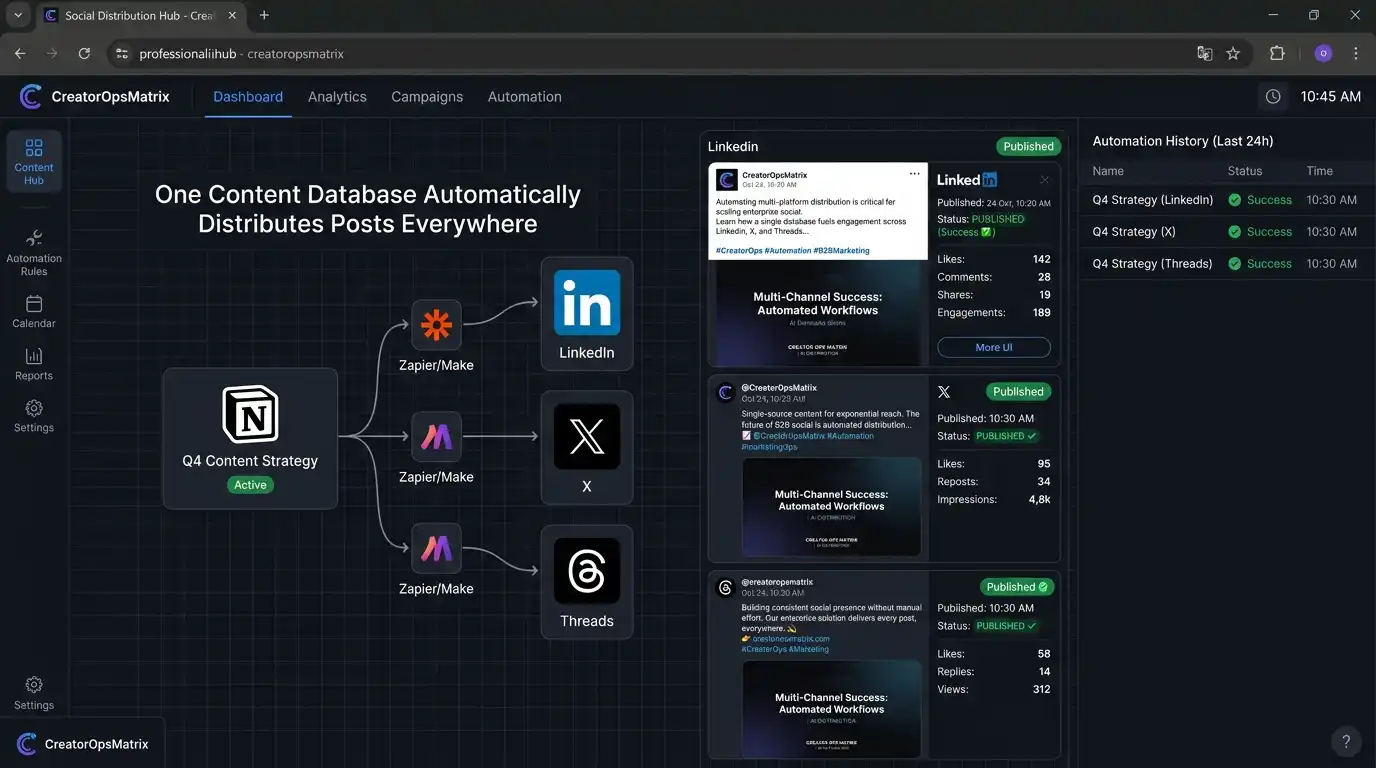
In Make.com, start a new scenario with the Notion — Watch Database Items module, connected to your database and filtered to only fire when the status property equals “Ready to Publish.” This becomes your trigger.
→ Create your free Make.com scenarioRouting to each platform
Add a Router module after the trigger. Each branch of the router checks the platform tags on the row — if “LinkedIn” is one of the tags, that branch sends the post text to LinkedIn’s API; if “Bluesky” is tagged, a separate branch handles that. A single Notion row can fire multiple branches simultaneously if it’s tagged for more than one platform. This is also the layer where a per-post-cost platform like X becomes easy to isolate — put X on its own branch so you can see exactly what it’s costing you, separate from your free-to-post platforms.
After each platform module completes successfully, add a final step that updates the Notion row’s status back to “Published,” so your database always reflects what has actually gone live.
[ROUTER] Platform tags found: LinkedIn, Bluesky
[BRANCH A] Posting to LinkedIn…
[SUCCESS] LinkedIn post created
[BRANCH B] Posting to Bluesky…
[SUCCESS] Bluesky post created
[NOTION] Row status updated to: Published
The real cost of posting to X in 2026
This is the part of the “free Buffer alternative” idea that’s changed the most, because most guides still describe X’s API as free — it isn’t, and the numbers are precise enough to plan around.
X’s API has run on pay-per-use since February 9, 2026
New developers get no free tier at all — you load credits in the Developer Console before making any call. The legacy $200/month Basic and $5,000/month Pro subscriptions are closed to new signups, and X began auto-migrating remaining Basic subscribers to pay-per-use on June 1, 2026.
| Action | Cost per request |
|---|---|
| Plain text or media post | $0.015 |
| Post containing a URL | $0.20 (≈13× the plain-post rate) |
| Reading a post | $0.005 (or $0.001 for reading your own account’s data) |
What this means in practice: post text-only content a few times a day and the API cost is genuinely small — a light publisher often lands under $10/month. But if your content workflow always includes a link back to your site, which most does, that $0.20-per-post rate changes the math fast: 500 link posts a month runs roughly $100 on writes alone, before any reads. Reads are capped at 2 million per month, above which X requires an Enterprise contract starting around $42,000/month.
Rates last verified against X’s official pricing documentation in July 2026, reflecting the April 20, 2026 update that raised plain-post pricing from $0.010 to $0.015 and introduced the $0.20 URL-post rate. X has changed this structure twice within a single year, so confirm current numbers on that page before building cost assumptions into your workflow.
This doesn’t break the overall approach — it just means X needs to be budgeted deliberately rather than assumed free like the other platforms. For many creators, the practical answer is to keep link-heavy X posting manual or handled through a separate flat-rate tool, while automating the platforms below where the API genuinely has no per-post cost.
Other platforms: free vs. free-but-gated
Outside of X, no platform charges per post — but “free” splits into two very different experiences. Bluesky, Mastodon, Telegram, and Discord let you start posting the moment you generate a token, no review queue involved. LinkedIn, Threads, Instagram, and Facebook are also free of charge, but Meta’s platforms specifically require an App Review process — typically weeks, not minutes — before your app can post on behalf of any account beyond a small set of test users.
Bluesky
Free — instantMastodon
Free — instantTelegram
Free — instantDiscord
Free — instantPersonal profile only, no partner review
Threads
Free — Meta App ReviewWeeks-long approval for non-test accounts
X (Twitter)
Pay per postFor LinkedIn specifically: posting to your own personal profile uses the w_member_social scope, available through LinkedIn’s self-serve Consumer tier — no partner-program wait, no per-post charge. In practice you’ll still register a developer app on the LinkedIn Developer Portal, link it to a placeholder Company Page (required even for personal-only posting), and add the “Share on LinkedIn” product. Access tokens expire after 60 days and refresh tokens after 365, so build a reconnect step into your scenario rather than assuming a one-time setup. LinkedIn also caps requests at roughly 100 calls per day per member, and the current publishing endpoint is POST /rest/posts with a required LinkedIn-Version header — the older /ugcPosts endpoint still works but is deprecated. Posting on behalf of a Company Page or other users needs w_organization_social, which does sit behind the gated Marketing Developer Platform.
For Threads: Meta’s App Review requirement applies once you’re posting for any account beyond a handful of test users on your own app — most solo-creator setups posting only to their own account can often stay in a lighter test mode, but production access for a client or team account needs the full review, submitted with a screencast and privacy policy. Once approved, Threads allows up to roughly 250 published posts per rolling 24-hour window per account, which is far beyond what a content calendar workflow needs.
Common issues and fixes
Three things that trip people up
- Notion’s text formatting doesn’t translate. If your post content uses Notion’s rich text (bold, links rendered as markdown), most platform APIs expect plain text in the post body. Add a text-formatting step in Make.com to strip markdown syntax before the post is sent — otherwise asterisks and brackets will appear literally in the published post.
- Posting too quickly triggers rate limits. If a single Notion update fires posts to several platforms at once, and you’re testing by changing several rows’ statuses in quick succession, some platforms will rate-limit or temporarily flag the activity — LinkedIn’s roughly 100-call daily cap per member is easy to hit during testing if you’re re-running the same scenario repeatedly. Add a short delay between branches if you’re publishing to the same platform repeatedly in a short window.
- OAuth tokens expire and need reconnecting. Social platform connections in Make.com periodically need re-authorization — LinkedIn’s 60-day token lifespan is a good example. This is normal and is enforced by the platforms themselves, not a Make.com issue. When a module starts returning an authorization error, open its connection settings and reconnect the account.
Pre-built Make.com blueprint
The full scenario — Notion trigger, router, platform modules, and status update — is available as an importable Make.com blueprint, along with a starter Notion database template.
Get the blueprint →Frequently asked questions
What is the best free Buffer alternative?
A Notion database used as a content calendar, connected to Make.com, which publishes posts automatically when their status changes to “ready.” This has no per-channel fee and no 10-post queue limit, unlike Buffer’s free plan which caps you at 3 channels and 10 queued posts per channel.
How much does it cost to post to X (Twitter) via API in 2026?
There’s no free tier for new developers as of February 2026. Pay-per-use pricing runs $0.015 per plain post and $0.20 per post containing a URL — about 13 times more, following an April 2026 rate change. Reads cost $0.005 per post (or $0.001 for your own account’s data), capped at 2 million reads/month before Enterprise pricing kicks in. A light, text-only publisher often lands under $10/month; link-heavy posting adds up much faster.
Can I automate LinkedIn posts with Make.com for free?
Yes, for your own personal profile — no per-post charge and no lengthy partner review required for the w_member_social scope. You’ll still register a developer app, link it to a placeholder Company Page, add the Share on LinkedIn product, and handle 60-day token expiry. Posting on behalf of a Company Page or other users needs the gated Marketing Developer Platform instead.
Which social platforms have genuinely free, low-friction APIs for automation in 2026?
Bluesky, Mastodon, Telegram, and Discord offer instant, review-free access with no per-post charge. LinkedIn personal-profile posting is free but needs developer app setup. Threads, Instagram, and Facebook carry no per-post fee either, but posting to any account beyond your own requires Meta’s App Review process, typically weeks. X is the one platform with an actual per-post dollar cost.
Do I need a paid Make.com plan for this automation?
Not for moderate volume. Make.com’s free plan includes 1,000 operations per month. A typical multi-platform post consumes roughly 3-5 operations depending on how many platforms it’s routed to, which supports somewhere around 150-300 posts per month before you’d need to upgrade to the Core plan.
Ready to build it?
Make.com’s free tier is enough to run this entire workflow at moderate posting volume — no card required to start.
Create your free Make.com account →Disclosure: CreatorOpsMatrix is an independent automation publication. The link to Make.com on this page is an affiliate link — if you sign up through it, we may earn a commission at no extra cost to you. API pricing for third-party platforms, especially X, changes frequently — verify current rates directly with each platform before relying on this setup for production use.